

Seedance 2.5 Prompt Guide: References, R2V, and 30-Second Scenes
Most bad AI video doesn't come from a bad model. It comes from prompts that describe a photograph — a subject, a place, some adjectives — and then hope motion shows up on its own. It usually doesn't, and with Seedance 2.5 giving you 30 continuous seconds to fill, an under-directed prompt now produces 30 seconds of beautifully rendered nothing.
This guide is a preparation framework, stitched together from public Seedance 2.5 materials, Seedance 2.0 production experience, and prompt patterns that should transfer once official Seedance 2.5 access is available.
The base structure (and why word order matters)
The consensus formula across pretty much every serious Seedance guide looks like this:
Subject → Action → Environment → Camera → Lighting → Style
The ordering isn't cosmetic. The model weights the opening of your prompt most heavily — the first 20 to 30 words effectively lock in who is in frame and what they're doing. Spend those words on your subject and its motion, not on "masterpiece, ultra quality, 8K" incantations, which do roughly nothing.
A weak prompt: "A beautiful cyberpunk city at night, stunning, cinematic, highly detailed." That's a wallpaper.
A working prompt: "A courier on an electric bike weaves between cars on a rain-slicked neon street, camera tracking alongside at wheel height, headlights smearing across wet asphalt, cold blue palette with magenta signage, handheld energy." Subject, motion, camera, light, mood — each doing a job.
One more habit worth stealing: say what the camera isn't doing. "No cuts, no zoom" is a surprisingly effective way to hold a single continuous shot, especially for POV work.
Timeline prompting: how to fill 30 seconds on purpose
For clips under ten seconds you can get away with one flowing description. At 30 seconds you're directing a scene, and the technique that works is structuring the prompt around timestamps:
[0s] Wide establishing shot: a lighthouse on a black cliff, storm building at sea, dusk.
[8s] Camera pushes in slowly; the keeper exits the door and leans into the wind.
[18s] Cut to close-up: rain streaking his face as he looks up — the lamp flickers out.
[24s] Pull back and crane up: the tower dark against lightning, waves detonating below.
Three or four beats is the sweet spot. The model treats these as temporal anchors and spreads the action across them instead of cramming everything into the first frames. Overload a single timestamp with three events and it'll pick one, more or less at random.
Two caveats from experience: transitions render as flowing camera moves rather than hard editorial cuts (even when you write "cut to"), and fidelity to the exact second markers is approximate. Think of timestamps as pacing hints, not a timecode contract.
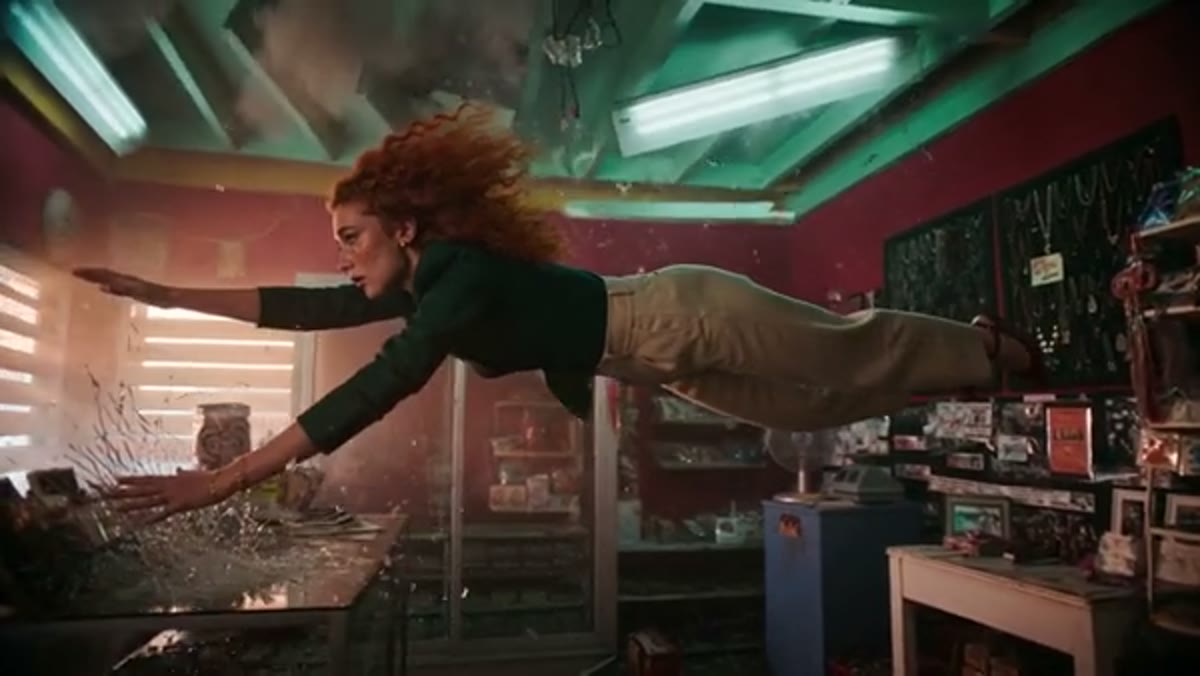
From the prompt: "A woman with wild curly red hair dives horizontally through the air inside a retro convenience store... teal and magenta neon glow, high-energy action sequence." Specific motion + specific palette = usable take.
Making 50 reference slots earn their keep
Seedance 2.5 takes up to 50 reference inputs — 30 images, 10 video clips, 10 audio files. The mistake almost everyone makes at first (we did) is uploading references and never mentioning them, as if the model will guess what each one is for. It won't, reliably.
Reference by name, and give each one a role. In our workspace the syntax is @image-1, @video-1, @audio-1; other platforms write it as "Image 1" — same idea everywhere:
"The woman from @image-1 (keep the scar and the jacket) walks through the market from @image-2. Match the handheld camera energy of @video-1. Score with @audio-1, cutting movement to the drum hits."
Some patterns that consistently pay off:
- Character sheets over single portraits. Three to five images of the same character — front, profile, expression, outfit detail — hold identity across a 30-second take far better than one perfect headshot.
- Reuse the identical reference set across shots. Same files, same order, when generating a sequence. Consistency in, consistency out.
- Audio as timing, not decoration. A music reference doesn't just set mood; motion tends to sync loosely to its rhythm. Pick the track before generating, not in the edit.
The R2V trick: directing with gray boxes
The most director-brained feature in 2.5 is reference-to-video with 3D white-model input, and it sounds fancier than it is. You open Blender (or anything that renders), build the scene as untextured gray blocks — a box for the character, planes for walls — animate the block and the camera through the exact move you want, and export that ugly little clip as a video reference.
Because there's no texture or lighting to distract it, the model reads pure trajectory, framing, and speed off the reference, then dresses the shot with your actual character and environment from the other references. Green-screen footage of a real person does the same job for human performance — the physical motion carries over, the appearance comes from your image refs.
It's previz-to-final compressed into one step, and for choreography-heavy shots (fights, dances, complex product rotations) it beats any amount of prose. Text can't say "the camera arcs 140 degrees while descending" as precisely as a reference clip just showing it.
Dan Kieft's filmmaking test above walks through reference-driven generations on real projects — worth watching for the parts where it doesn't work, honestly.
Sound, speech, and on-screen text
Audio generates in the same pass as the picture, so prompt it like part of the scene: "low wind bed, boots on gravel, one distant church bell" gets you further than adding music later. For dialogue, put the line in quotes and attribute it — "the vendor says: 'last box, take it or leave it'" — and lip-sync tracks surprisingly well, in eleven languages now.
On-screen text is the one place to stay conservative. Short, common words render fine ("SALE", a name, a title card); long phrases and unusual symbols still come out as alien calligraphy more often than not. If text matters, keep it under a few words and specify when and where it appears.
Revise with region edits, not re-rolls
Old workflow: 90% perfect take, one wrong detail, regenerate everything, lose the take. New workflow: keep the take, select the region, describe the change — "the jacket is olive green, not black" — and everything else (performance, camera, audio, timing) stays put.
This changes how you should iterate. Generate 2–3 variants at low resolution first, pick the take with the best motion — motion is the thing you can't fix — then repair details with region edits and re-render the keeper at 4K. Resolution is a rendering decision; the take is the creative one.
The mistakes that ruin most generations
Quick list, learned the annoying way:
- Adjective stacking. "Beautiful, stunning, gorgeous, epic" — pick one visual idea, describe it concretely.
- No motion in the prompt. If nothing is described as moving, expect a slideshow.
- Vague camera language. "Cinematic" is not a shot. "Slow dolly-in at eye level" is.
- Unlabeled references. Fifty slots means fifty opportunities for the model to guess wrong.
- One mega-prompt for everything. Wardrobe details in a wide shot waste weight; put them in the reference images instead.
- Judging on one roll. Outputs are probabilistic. Three attempts, pick the best skeleton, refine.
Three starting prompts you can copy
These are written for the structure above — swap the nouns, keep the scaffolding.
Product ad (12s, 16:9):
A matte-black wireless earbud case rotates slowly on a wet slate surface,
water droplets beading on the lid. [0s] Macro close-up on the hinge, shallow
depth of field. [5s] Case opens on its own; earbuds glow faintly from inside,
camera pulls back and arcs 90 degrees. [9s] Logo-free lid catches a single
soft light flare, rotation stops face-on. Studio lighting, deep charcoal
background, one cool rim light, product-photography realism. Audio: low
ambient hum, one clean click when the lid opens. No cuts.
Dialogue scene (20s, 16:9):
Two women sit across a diner booth at night, rain on the window behind them.
[0s] Wide two-shot establishing the booth, neon sign reflection on the table.
[6s] Slow push-in as the older woman says: "You knew before I did, didn't you?"
[12s] The younger one looks down, stirs her coffee, says quietly: "I found
the letter in March." [17s] Hold on her hands around the cup. Warm tungsten
key light, cool window fill, 35mm film texture, melancholic tone. Audio:
rain bed, distant highway, spoon against ceramic.
Stylized action (30s, 16:9, reference-driven):
The armored warrior from @image-1 (keep the gold pauldrons and face markings)
sprints across a burning rooftop from @image-2. [0s] Low tracking shot at
boot level, embers streaking past the lens. [8s] She vaults a collapsed beam;
camera cranes up to follow. [16s] Mid-air she draws the blade — match the
draw-and-slash motion from @video-1. [24s] Landing crouch, slow push-in on
her eyes through the smoke. Stylized CG animation, high-contrast firelight,
dark fantasy palette. Audio: crackling fire, one deep taiko hit on the landing.
That last one is the full pattern — named references, timeline beats, borrowed motion — and it's representative of how most good 2.5 work seems to get made: the prompt directs, the references cast and choreograph.
Steal these to start
The Seedance 2.5 page on our site shows capability examples and prompt structures you can study before access is available. Use them to prepare subjects, camera language, lighting notes, and reference sets, but remember that Seedance 2.5 generation is not available through RSW AI Studio yet. If you're planning to script this at scale, the API page tracks access status and expected request shape; it is not live API documentation yet.
The honest summary: prompt structure gets you to competent, references get you to consistent, and R2V gets you to directed. Most people stop at the first one. Don't.