Grok Imagine Video 1.5AI Video Generator

Create affordable Grok Imagine Video 1.5 clips from prompts or reference images with 480P and 720P controls.

Workspace

Model
Prompt
Image
Aspect Ratio
Duration
6s

The duration of the generated video in seconds

Try 365 DAYS Unlimited Seedance 2

Inspirations

Grok Imagine Video 1.5 examples

Watch three short scenes made with this model in our workspace. Each includes the prompt behind the motion.

Coffee by the rainy tram window

A slow push toward a cup as evening lights move across rain-streaked glass.

Prompt

One continuous six-second cinematic shot of a blue ceramic espresso cup on a small table beside a rain-streaked tram window at dusk. The tram moves gently; amber city lights slide across the glass while a thin curl of steam rises from the coffee. The camera makes a slow, steady push toward the cup. Keep the cup's shape and position consistent, natural reflections, no people, readable text, logos or cuts. Audio: soft tram rumble and rain, no speech or music.

One gesture in a rooftop garden

An orange robot tips its watering can in a single readable action.

Prompt

One continuous six-second wide shot of a small orange service robot watering pink flowers on a sunlit rooftop garden. The robot lifts a blue metal watering can, tilts it once, and a fine stream reaches the nearest flower pot. The camera tracks slowly from left to right, keeping the entire robot and pots in frame. Soft morning light, tactile painted-metal surfaces, distant skyline, consistent robot shape, natural water motion. No cuts, people, text, subtitles or logos. Audio: light breeze, soft water trickle, no speech or music.

Give a reference frame motion

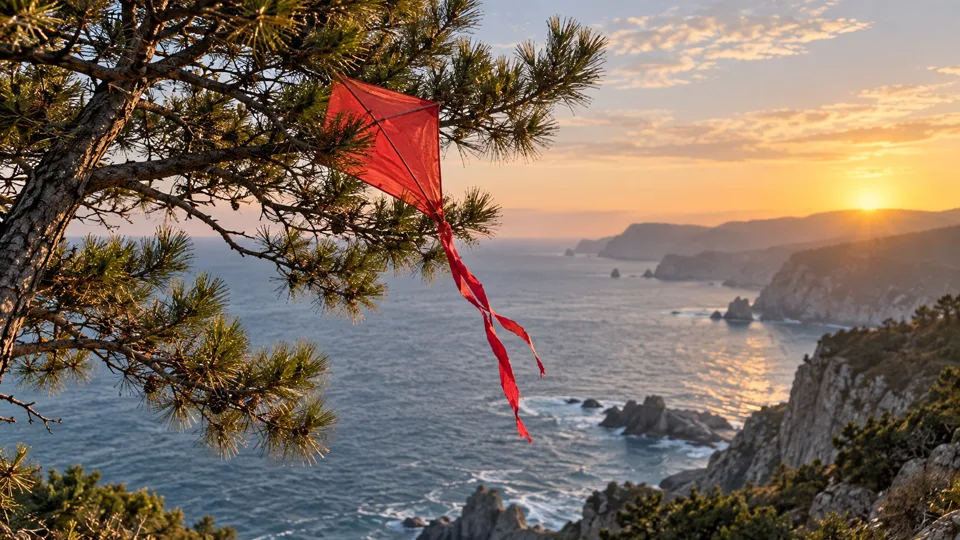
The crimson kite stays caught in the pine while its tail moves in the sea breeze.

Prompt

Starting from the uploaded image of a crimson paper kite caught in a coastal pine tree, keep the same kite, branch, cliffs and sunrise composition. In one continuous six-second shot, a light sea breeze makes the kite's long red tail flutter and the nearby pine needles sway. The kite stays caught in place. The camera slowly pushes closer, preserving the horizon and warm light. Natural paper and branch motion, gentle ocean ambience, no speech, music, people, writing, logos or cuts.

Add your own reference image. The example image is not uploaded for you.

What is Grok Imagine Video 1.5?

Grok Imagine Video 1.5 is an AI video model from xAI. On this page you can turn a written scene into a short clip, or add reference images when the composition should begin from something specific. The result is a video to watch and download, not a still-image slideshow.

Start with one action and one camera move. The coffee, robot and reference-led scenes above show three different briefs made in this workspace. They are creative examples, not a claim that every prompt will reproduce the same shot.

Need to design the starting frame first? Make one with GPT Image 2.0, then bring that image back to the Grok video workspace. You can also start from your own image if you have permission to use it.

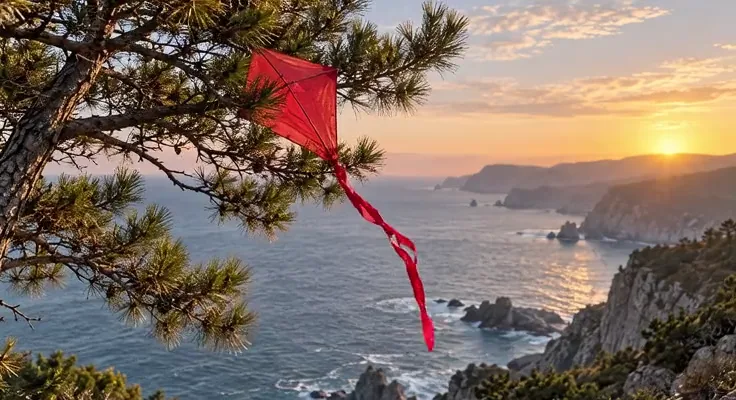
Crimson paper kite caught in a pine tree above a coastal cliff, used as a reference frame

A reference frame made with GPT Image 2.0 for the kite video above.

Grok Imagine Video 1.5 at a glance

These are the controls currently offered by the default Grok 1.5 option in our workspace. Review the live quote before generating.
Default Grok Imagine Video 1.5 controls in RSW AI Studio
ControlAvailable hereWhy it matters
InputText or up to 7 reference imagesBegin from an idea or guide the visual direction
Duration6–30 secondsGive a single action enough time to finish
Quality480p or 720pMatch a draft or a larger viewing surface
Framing16:9, 9:16, 1:1, 3:2 or 2:3Choose the canvas for your destination

How to make a Grok Imagine Video 1.5 clip

  1. Describe one shot

    Name the subject, what changes, the setting and the camera movement. If you need a recognizable starting composition, import a reference image before generating.
  2. Set the canvas

    Choose a ratio, duration and quality in the workspace. A short 480p draft is useful for checking motion; review the displayed credit quote for your exact settings.
  3. Watch, then refine

    Open History or My Creation. Watch the whole clip, including the last second; check continuity, framing and sound. Change one instruction before making another version.

Write motion into the prompt

A useful video prompt describes what happens over time. A list of visual adjectives alone leaves the movement unclear.
01

Subject and action

Give the subject one readable task: a robot tips a watering can once; a kite tail flutters while the branch stays in place.

02

Camera and framing

Choose one move, such as a slow push or side track. Say what should remain visible throughout the shot.

03

Continuity and sound

Identify the objects that must keep their shape. Add a short sound direction if it serves the scene, then listen to the result.

From idea to shot

“A cinematic robot in a garden” describes a mood but gives no sequence of movement.

“A small orange robot lifts one blue watering can and pours onto the nearest flower pot. Track slowly right while the robot and pots stay in frame. One continuous six-second shot, soft morning light.”

Keep a second take focused: if the subject drifts, simplify the camera move before adding more scene details.

Text to video or image to video?

Start from words

Use text when the scene is still open to interpretation. Give the model a subject, a place and one action before fine-tuning the style.

Start from an image

Use a reference when a color, object or composition matters. The kite example begins with a generated still, then asks for movement without changing the scene.

Choose your format

Plan landscape for a wide scene or portrait for a vertical feed. Match the ratio before generating rather than cropping away the action later.

For image-led clips, keep references visually compatible and explain what each one contributes. A reference guides the result; it does not guarantee exact preservation. Review hands, edges, lettering and object continuity before publishing your clip.

Grok Imagine Video 1.5 vs Grok 1.0

Compare the controls available in our workspaces, not unverified speed or quality rankings. The Stable option is a separate Grok 1.5 choice in the model selector.
Grok Imagine Video 1.5, Stable and Grok 1.0 options in RSW AI Studio
What to compareGrok 1.5 defaultGrok 1.5 StableGrok 1.0 Video
Start fromText or up to 7 imagesText or 1 imageText; separate image-to-video option
Clip length here6–30s1–15s6–30s
Quality choices480p / 720p480p / 720p480p / 720p
Distinct controlLonger single clipsSingle-image workflowFun, Normal and Spicy modes

Choose this default 1.5 workspace when you want a text or multi-image starting point and its 6–30 second range. For a single-image experiment, check Stable; for the older mode controls, open Grok 1.0 Video or its image-to-video workspace. Quotes and availability may differ, so check the selected model before submitting.

Pick the model around the shot

01

Atmosphere

Give a quiet setting one visible change: rain on glass, drifting steam or moving light. Keep the shot long enough to notice it.

02

Character action

Make a gesture readable from beginning to end. Avoid packing several unrelated actions into a short clip.

03

Reference-led scenes

Create a still first, then specify what moves and what stays. This helps when the same object and composition matter.

If your project needs different controls, compare the Kling 3.0 video workspace or Seedance 2.0. Keep the same brief when comparing models, and judge the actual clips rather than marketing claims.

Grok Imagine Video 1.5 questions

Can I generate without uploading an image?

Yes. Write a scene prompt and choose the ratio, duration and quality. The default workspace accepts text-only requests; references are optional.

How many images can I use?

The default Grok 1.5 option in this workspace accepts up to seven reference images. Grok 1.5 Stable is a separate one-image option. Select the intended model before uploading.

Can I make a vertical video?

Yes. Select 9:16 or 2:3 before generating. Put the action near the center and leave room for any captions you will add later in an editor.

What does Recreate do?

It loads an example prompt and compatible settings into the workspace for you to review. It does not upload the example image, start a generation or charge credits automatically.

What will my video cost?

The Generate button shows the current credit quote for your selected settings and account. Review it before submitting; see plans and credits for access options.

What should I check before using the result?

Watch the entire clip with sound when relevant. Check subject continuity, unwanted text, edges and the final frame. If something drifts, try a simpler action or a clearer reference.

Choose Your Plan

Seedance 2.0Seedance 2.0Sora 2Sora 2Veo 3.1Veo 3.1Grok Imagine Video 1.5Grok Imagine Video 1.5KlingKlingNano BananaNano BananaGPT Image 2.0GPT Image 2.0Grok ImageGrok ImageElevenLabs TTSElevenLabs TTSSunoSuno
No hidden fees. Cancel anytime.
MOST POPULAR

Pro

$13$4.99/month equivalent

$59.88 billed annually

60% OFF vs Monthly

417 credits /month

+117 Bonus vs Monthly$0.012/credit
  • Access to all video models
  • Up to 6 Concurrent Tasks
  • At least ~416 images/month
  • Up to ~60 videos/month
  • At least ~52 songs/month
  • High Removing Stability
  • Priority customer support

Unlimited Generation Privileges

Free to generate, lower priority

  • GPT Image 2.01K/2K/4K30 Days Unlimited
  • NanoBanana Pro1K/2K/4K30 Days Unlimited
  • ElevenLabs TTS30 Days Unlimited
  • Suno30 Days Unlimited
BEST VALUE

Pro Unlimited

$70$39/month equivalent

$468 billed annually

45% OFF vs Monthly

2,500 credits /month

  • Access to all video models
  • Up to 10 Concurrent Tasks
  • At least ~2,500 images/month
  • At least ~357 videos/month
  • At least ~312 songs/month
  • Maximum Removal Stability
  • Priority customer support

Unlimited Generation Privileges

Free to generate, high priority

  • Seedance 2.0480P/720P
    Seedance 2.0 Fast10 Days Unlimited
    Seedance 2.0 Standard10 Days Unlimited
    Seedance 2.0 Mini10 Days Unlimited
  • GPT Image 2.01K/2K/4K365 Days Unlimited
  • NanoBanana Pro1K/2K/4K365 Days Unlimited
  • Sora 210 Days Unlimited
  • Sora 2 Pro10 Days Unlimited
  • Grok ImagineVideo 1.514 Days Unlimited
  • Kling 3.010 Days Unlimited
  • ElevenLabs TTS365 Days Unlimited
  • Suno365 Days Unlimited
ULTRA

Pro Ultra Unlimited

$174$58/month equivalent

$696 billed annually

66% Cheaper Than Competitors

3,750 credits /month

  • Access to all video models
  • Up to 20 Concurrent Tasks
  • At least ~3,750 images/month
  • At least ~530 videos/month
  • At least ~464 songs/month
  • Maximum Removal Stability
  • Priority customer support

Unlimited Generation Privileges

Free to generate, priority capacity

  • Seedance 2.0480P/720P
    Seedance 2.0 Fast30 Days Unlimited
    Seedance 2.0 Standard30 Days Unlimited
    Seedance 2.0 Mini365 Days Unlimited
  • GPT Image 2.01K/2K/4K365 Days Unlimited
  • NanoBanana Pro1K/2K/4K365 Days Unlimited
  • Sora 2720P365 Days Unlimited
  • Sora 2 Pro720P365 Days Unlimited
  • Grok ImagineVideo 1.5480P/720P365 Days Unlimited
  • Kling 3.0720P365 Days Unlimited
  • ElevenLabs TTS365 Days Unlimited
  • Suno365 Days Unlimited
MAX

Pro Max Unlimited

$249$199/month equivalent

$2388 billed annually

20% Cheaper Than Competitors

5,000 credits /month

  • Access to all video models
  • Up to 30 Concurrent Tasks
  • At least ~5,000 images/month
  • At least ~714 videos/month
  • At least ~624 songs/month
  • All Pro Unlimited features included

Unlimited Generation Privileges

365-day priority-capacity access

  • Seedance 2.0480P/720P
    Seedance 2.0 Fast365 Days Unlimited
    Seedance 2.0 Standard365 Days Unlimited
    Seedance 2.0 Mini365 Days Unlimited
  • GPT Image 2.01K/2K/4K365 Days Unlimited
  • NanoBanana Pro1K/2K/4K365 Days Unlimited
  • Sora 2720P365 Days Unlimited
  • Sora 2 Pro720P365 Days Unlimited
  • Grok ImagineVideo 1.5480P/720P365 Days Unlimited
  • Kling 3.0720P365 Days Unlimited
  • ElevenLabs TTS365 Days Unlimited
  • Suno365 Days Unlimited

Buy More Credits

Add one-time credit packs anytime. Existing subscription benefits remain unchanged.

Basic

$29.90

ONE-TIME • No recurring charges

2,000 credits$0.0149 / Credit
Base rate
28% OFF

Standard

$69.90

ONE-TIME • No recurring charges

6,500 credits$0.0108 / Credit
42% OFF

Ultra

$199.90

ONE-TIME • No recurring charges

23,000 credits$0.0087 / Credit