Kling 3.0AI Video Generator

Create high-quality Kling 3.0 videos with prompt, duration, sound, 4K, and frame controls.

Workspace

Model
Prompt
Reference saved elements in prompt with @ElementName
Image
Add end frame

Upload JPG/PNG/WEBP images up to 10MB, with a minimum width/height of 300px.

Aspect Ratio
Duration
3s
Range
3s - 15s
3 seconds15 seconds
Multi-shots

Create multiple shots in one request. Sound can be configured separately.

Sound

Toggle native audio output for this clip.

Resolution
Try 365 DAYS Unlimited Seedance 2

Inspirations

Kling 3.0 video examples

Explore short scenes made with Kling 3.0 in this workspace. Read the prompt and choose a starting point for your own shot.

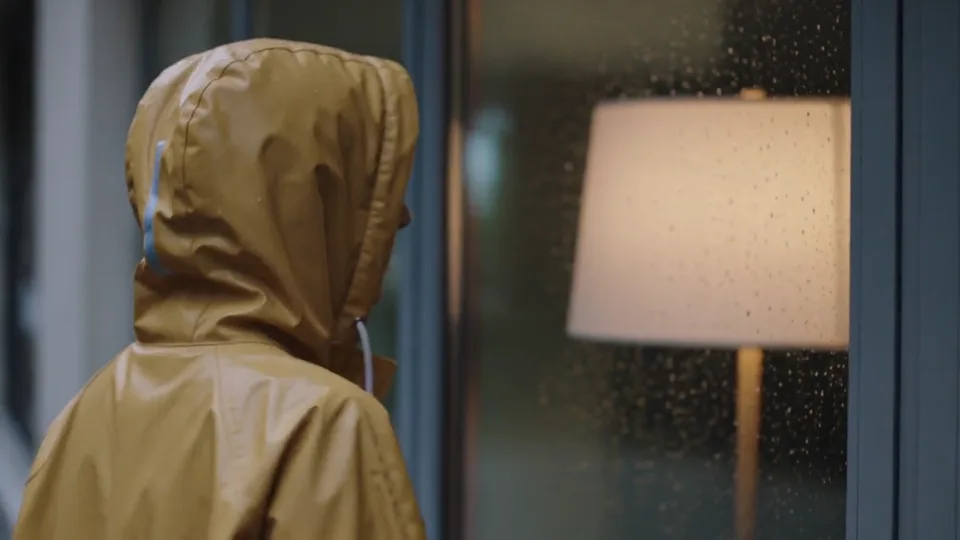
Warm light on a rainy evening

One continuous camera move, a simple gesture, and rain ambience.

Prompt

A single five-second cinematic medium shot at shoulder height. A woman in a mustard-yellow raincoat pauses beside a warmly lit window on a rainy evening, then gently turns her face toward the light. The composition includes only her upper body, softly blurred amber light through plain glass, and rain in the foreground. No storefront facade, signs, lettering, readable books or street names are in frame. Slow restrained camera push-in, natural blinking, consistent facial features, realistic raindrops and warm reflections, no cuts. Audio: soft falling rain and a quiet distant city ambience, no speech or music. No text, logos or subtitles.
Give one action room to unfold

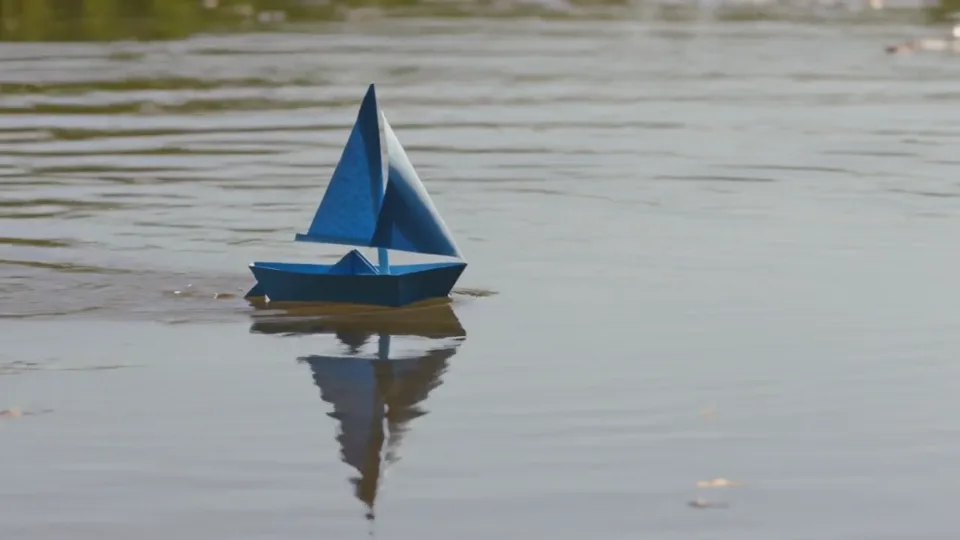
A paper boat moves through a scene while the camera tracks it.

Prompt

One continuous low-angle tracking shot of a single blue paper sailboat floating from left to right across a shallow sunlit pond. The camera gently follows at water level as the boat passes a reed. Small ripples trail behind it. Preserve the folded paper hull and sail, soft afternoon reflections and realistic scale. No people, text, cuts or additional boats.

Animate a detail in your first frame

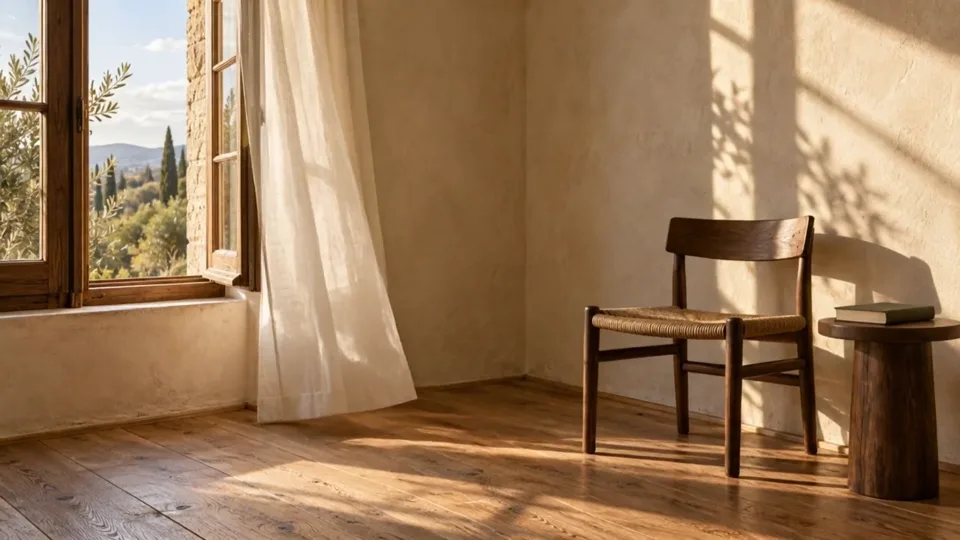
A still room provides the composition; the prompt adds curtain movement.

Prompt

Starting from the provided room image, a light breeze slowly lifts the sheer curtain beside the open window and lets it settle. The camera stays locked. Keep the window frame, furniture, wall details, and daylight direction unchanged. One continuous shot, no new objects or text.

Add your own first-frame image in the workspace.

What is Kling 3.0?

Kling 3.0 is Kuaishou’s AI video model for creating short scenes from text or images. This workspace gives you control over the opening frame, an optional ending frame, sound and individual shots. Use it to develop a story beat, animate a product composition or explore an atmospheric scene.

The three examples above offer different starting points: a rain-lit portrait, a paper boat in motion and a room animated from a first frame. Pick the example closest to your task, then adapt its direction. For a simpler text-or-single-image workflow, compare Kling 3.0 Turbo.

Kling 3.0 features and output settings

Choose the controls that change your shot, then set its delivery format.

Three starting points

Describe a scene from scratch, animate a first frame, or guide a single shot between opening and ending images.

Generated sound

Enable audio for ambience, effects or dialogue. Keep sound instructions close to the action they accompany.

Shot-by-shot direction

Use separate prompts and durations for a sequence, or keep one continuous shot for a simple movement.
Duration
3–15 seconds
Output modes
Standard 720p · Pro 1080p · 4K
Text-to-video ratios
16:9 landscape · 9:16 portrait · 1:1 square

Turn a first frame into a moving scene

Sunlit reading room with an open wooden window, sheer curtain, chair and a book on a side table

The reading-room image establishes the window, chair, book and daylight. The video prompt only needs to add a gentle breeze through the curtain. A locked camera makes that small movement readable against the still furniture.

Separate what changes from what stays: move the fabric, preserve the room layout. Check the window edges and chair as the clip plays; if they shift, simplify the motion before asking for a larger camera move.

For a planned ending, choose a compatible last frame rather than a different room or viewpoint. To create an original starting composition, make an image with GPT Image 2, then upload your chosen image in Kling.

Create a Kling video in three steps

  1. Choose your starting point

    Begin with a text prompt or upload a first frame. For image-to-video, compose the image in the shape you need and leave room for the planned movement.
  2. Set the shot and review

    Choose duration, output mode and sound. Start with a single shot; use multi-shot controls when cuts serve the scene. Check the current credit quote, then choose Generate.
  3. Watch, compare and refine

    Play the entire result. Check subject shape, motion direction, camera movement and sound. Change one instruction in the next attempt so you can judge what improved.

Write a prompt that directs the action

Give the subject and the camera separate jobs. A clear change over time is more useful than a long list of cinematic adjectives.
Subject + setting
A blue paper sailboat floats on a shallow pond in soft afternoon light.
Action
The boat travels left to right, leaving small ripples behind it.
Camera
A low camera tracks alongside, keeping the entire boat in view.
Continuity
Keep the folded hull and sail unchanged. One continuous shot, no cuts.

For multiple shots, assign one clear beat to each segment. Repeat the clothing, lighting and location details that should survive a cut. Keep each action short enough for its allotted duration, and make the segment lengths add up to the full clip.

Kling 3.0 vs Kling 3.0 Turbo

Choose by the inputs and controls your scene needs.
Available workspace controls for Kling 3.0 and Kling 3.0 Turbo
ControlKling 3.0Kling 3.0 Turbo
InputsText; first frame; first and last framesText or one first frame
Duration3–15 seconds3–15 seconds
Output720p, 1080p or 4K720p or 1080p
Audio settingAvailableNo separate audio control
Shot controlsSeparate prompts and durationsOne prompt field

Choose this workspace when an ending frame, sound setting or separately timed shots matter. Choose Turbo for a text-or-first-frame workflow at 720p or 1080p. For multiple reference assets, explore Seedance 2.0.

Choose a scene with a clear visual purpose

A character moment

Use one readable gesture, such as turning toward a window. Keep the camera move restrained so the face remains the focus; review facial details through the whole clip, not just the opening frame.

A product or room study

Start with an image when placement and proportions matter. Move one part of the scene or introduce a small camera move. Leave labels and fine product text for a careful final review.

A short story sequence

Use multi-shot controls for distinct beats: establish the place, show the action, then show the reaction. Keep the same subject details across prompts and give each beat enough time to read.

Kling 3.0 questions

Can I create a Kling 3.0 video without an image?

Yes. Text-to-video builds the scene from your description. Set the subject, action, camera and framing in the prompt and workspace. Use a first frame instead when a particular room, product or composition already exists.

How do first and last frames work?

Add the first frame before the last. The first image establishes the opening; the last guides the destination. Keep their subject scale and layout compatible. Multi-shot mode accepts a first frame but not a last frame.

Does Kling 3.0 generate sound?

Enable the audio option and describe the sound alongside the action: rain against glass, footsteps, or a short spoken line. Listen to the result before using it, especially when dialogue needs to match a visible speaker.

Can I make a longer video or several shots?

Each generation is 3–15 seconds. In multi-shot mode, give each segment its own prompt and duration; the durations must add up to the full clip. For a longer edit, assemble selected clips in your video editor.

What does Recreate do?

Recreate loads the example prompt and compatible settings for review. It does not generate or charge automatically. Image-led examples need your own suitable first frame; the sample image is not uploaded for you. Existing incompatible references are protected.

How many credits will my video use?

Check the workspace quote after selecting duration, output mode and audio. Those settings and your eligible plan benefits determine the quote. Review it before choosing Generate; changing the shot length or output can change the cost.

Choose Your Plan

Seedance 2.0Seedance 2.0Sora 2Sora 2Veo 3.1Veo 3.1Grok Imagine Video 1.5Grok Imagine Video 1.5KlingKlingNano BananaNano BananaGPT Image 2.0GPT Image 2.0Grok ImageGrok ImageElevenLabs TTSElevenLabs TTSSunoSuno
No hidden fees. Cancel anytime.
MOST POPULAR

Pro

$13$4.99/month equivalent

$59.88 billed annually

60% OFF vs Monthly

417 credits /month

+117 Bonus vs Monthly$0.012/credit
  • Access to all video models
  • Up to 6 Concurrent Tasks
  • At least ~416 images/month
  • Up to ~60 videos/month
  • At least ~52 songs/month
  • High Removing Stability
  • Priority customer support

Unlimited Generation Privileges

Free to generate, lower priority

  • GPT Image 2.01K/2K/4K30 Days Unlimited
  • NanoBanana Pro1K/2K/4K30 Days Unlimited
  • ElevenLabs TTS30 Days Unlimited
  • Suno30 Days Unlimited
BEST VALUE

Pro Unlimited

$70$39/month equivalent

$468 billed annually

45% OFF vs Monthly

2,500 credits /month

  • Access to all video models
  • Up to 10 Concurrent Tasks
  • At least ~2,500 images/month
  • At least ~357 videos/month
  • At least ~312 songs/month
  • Maximum Removal Stability
  • Priority customer support

Unlimited Generation Privileges

Free to generate, high priority

  • Seedance 2.0480P/720P
    Seedance 2.0 Fast10 Days Unlimited
    Seedance 2.0 Standard10 Days Unlimited
    Seedance 2.0 Mini10 Days Unlimited
  • GPT Image 2.01K/2K/4K365 Days Unlimited
  • NanoBanana Pro1K/2K/4K365 Days Unlimited
  • Sora 210 Days Unlimited
  • Sora 2 Pro10 Days Unlimited
  • Grok ImagineVideo 1.514 Days Unlimited
  • Kling 3.010 Days Unlimited
  • ElevenLabs TTS365 Days Unlimited
  • Suno365 Days Unlimited
ULTRA

Pro Ultra Unlimited

$174$58/month equivalent

$696 billed annually

66% Cheaper Than Competitors

3,750 credits /month

  • Access to all video models
  • Up to 20 Concurrent Tasks
  • At least ~3,750 images/month
  • At least ~530 videos/month
  • At least ~464 songs/month
  • Maximum Removal Stability
  • Priority customer support

Unlimited Generation Privileges

Free to generate, priority capacity

  • Seedance 2.0480P/720P
    Seedance 2.0 Fast30 Days Unlimited
    Seedance 2.0 Standard30 Days Unlimited
    Seedance 2.0 Mini365 Days Unlimited
  • GPT Image 2.01K/2K/4K365 Days Unlimited
  • NanoBanana Pro1K/2K/4K365 Days Unlimited
  • Sora 2720P365 Days Unlimited
  • Sora 2 Pro720P365 Days Unlimited
  • Grok ImagineVideo 1.5480P/720P365 Days Unlimited
  • Kling 3.0720P365 Days Unlimited
  • ElevenLabs TTS365 Days Unlimited
  • Suno365 Days Unlimited
MAX

Pro Max Unlimited

$249$199/month equivalent

$2388 billed annually

20% Cheaper Than Competitors

5,000 credits /month

  • Access to all video models
  • Up to 30 Concurrent Tasks
  • At least ~5,000 images/month
  • At least ~714 videos/month
  • At least ~624 songs/month
  • All Pro Unlimited features included

Unlimited Generation Privileges

365-day priority-capacity access

  • Seedance 2.0480P/720P
    Seedance 2.0 Fast365 Days Unlimited
    Seedance 2.0 Standard365 Days Unlimited
    Seedance 2.0 Mini365 Days Unlimited
  • GPT Image 2.01K/2K/4K365 Days Unlimited
  • NanoBanana Pro1K/2K/4K365 Days Unlimited
  • Sora 2720P365 Days Unlimited
  • Sora 2 Pro720P365 Days Unlimited
  • Grok ImagineVideo 1.5480P/720P365 Days Unlimited
  • Kling 3.0720P365 Days Unlimited
  • ElevenLabs TTS365 Days Unlimited
  • Suno365 Days Unlimited

Buy More Credits

Add one-time credit packs anytime. Existing subscription benefits remain unchanged.

Basic

$29.90

ONE-TIME • No recurring charges

2,000 credits$0.0149 / Credit
Base rate
28% OFF

Standard

$69.90

ONE-TIME • No recurring charges

6,500 credits$0.0108 / Credit
42% OFF

Ultra

$199.90

ONE-TIME • No recurring charges

23,000 credits$0.0087 / Credit