Kling 3.0 TurboAI Video Generator

Create fast Kling 3.0 Turbo clips from text or a first-frame image in 720P and 1080P.

Workspace

Model
Prompt (Optional)
Image

Upload JPG/PNG images up to 50MB, with a minimum width/height of 300px.

Aspect Ratio
Try 365 DAYS Unlimited Seedance 2

Inspirations

Kling 3.0 Turbo video examples

Explore text and first-frame video ideas made with Turbo in this workspace. Each example includes its starting prompt.

Keep one action easy to follow

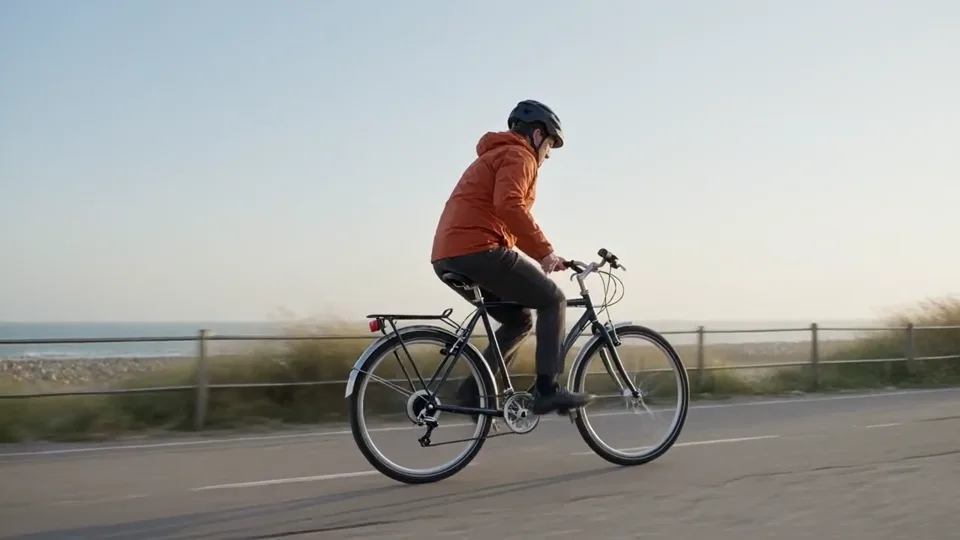
A text-to-video tracking shot tests clear subject movement and a readable background.

Prompt

A lone adult cyclist wearing a rust-orange jacket rides a plain dark bicycle from left to right along a flat coastal path at sunrise. A low side-tracking camera moves alongside at the same pace, keeping the entire bicycle and rider in view. Distant sea and pale grasses move gently behind them. Natural soft light, realistic proportions, restrained documentary style. One continuous shot with steady forward motion, no cuts, no logos or on-screen text.

Build depth into a small scene

An original text-to-video paper observatory uses one slow push-in and layered foreground elements.

Prompt

A handcrafted paper observatory stands on a small indigo hill beneath a deep blue evening sky. Warm amber light glows inside its round windows. Layered paper pine trees frame the foreground, with small folded clouds farther away. The camera slowly pushes forward between the trees toward the observatory, revealing gentle parallax between the paper layers. Keep the observatory shape and window positions stable. Tactile cut-paper edges, soft miniature-set lighting, one continuous shot, no people, lettering or cuts.

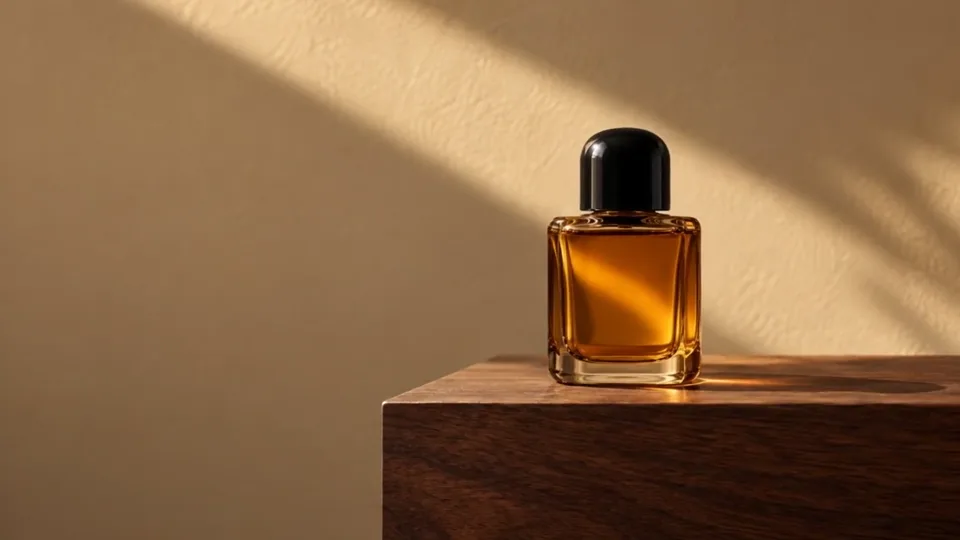
Slide past an amber perfume bottle

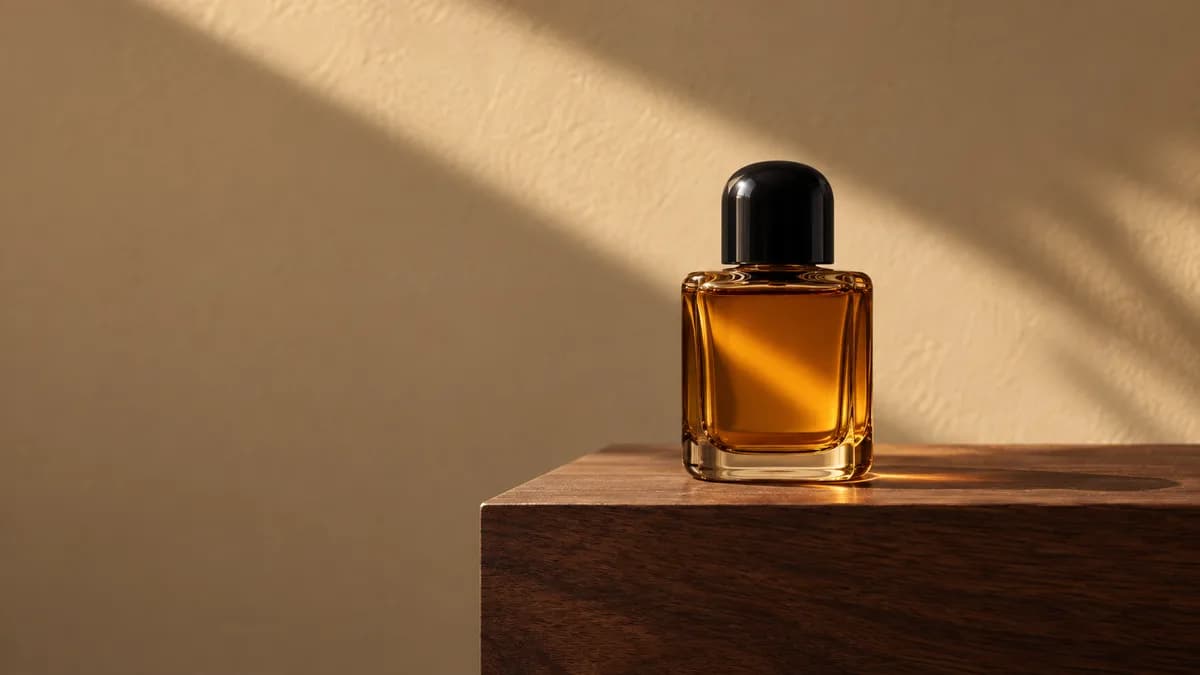
One amber bottle with a rounded black cap stays still on walnut while the camera slides slowly right.

Prompt

Use the uploaded perfume photograph as the first frame. The camera slowly slides a short distance to the right, keeping the single amber glass bottle and rounded black cap in focus. A soft daylight reflection travels gently across the glass. Keep the bottle upright on the walnut plinth, with its cap closed and its silhouette unchanged. Preserve the warm sand-colored wall and natural contact shadow. One continuous shot, no cuts, no added objects, labels or text.

Add your own first-frame image in the workspace.

What is Kling 3.0 Turbo?

Kling 3.0 Turbo is a video model in Kuaishou’s Kling 3 family. On this site, it turns a written scene or one first-frame image into a 3–15 second clip at 720p or 1080p. Use text when you want to invent the composition; bring an image when the subject and framing are already decided.

The examples explore a moving cyclist, a layered paper observatory and a camera slide past a perfume bottle. Each starts with a different visual problem, not just a different style. If your shot needs an ending frame or a sound setting, compare the Kling 3.0 workspace.

Kling 3.0 Turbo features and specifications

A compact set of controls for text-to-video and first-frame animation.

Text or one first frame

Describe a new scene, or animate an existing composition. With an image, focus your prompt on the movement you want to add.

3–15 seconds

Choose a whole-number duration. Give one clear action enough time to develop before adding another beat.

720p or 1080p

Select output resolution in the workspace. Text-to-video supports landscape 16:9, portrait 9:16 or square 1:1.

For image-to-video, use one JPG or PNG up to 50MB, with each side at least 300px and a width-to-height ratio between 1:2.5 and 2.5:1. The first frame determines the output ratio. The prompt field accepts up to 3,072 characters.

Build movement around a still product

An unlabeled amber perfume bottle with a black cap on walnut in warm side light

The perfume first frame fixes the bottle, cap, walnut surface and warm background. Ask for a short camera slide to the right while the bottle stays upright. This creates a specific shot to evaluate: a changing viewpoint around an otherwise still product.

Watch the glass edges, cap and contact shadow throughout the result. If the bottle turns or drifts, make the instruction more explicit: the camera moves, the product does not. A small slide asks for less unseen geometry than a complete orbit.

Prepare your own uncluttered product image, or create one with GPT Image 2. Leave space in the direction of the camera move and upload the JPG or PNG as your first frame.

From shot idea to video in three steps

  1. Pick text or a first frame

    Start with words for a new scene. Upload one image when its composition matters, then describe the motion you want to add. Choose your framing before generating.
  2. Set length and resolution

    Choose 3–15 seconds and 720p or 1080p. A five-second test can explore one movement without fitting a whole story into the clip. Review the quote, then choose Generate.
  3. Review the entire shot

    Check the beginning, middle and end for subject shape, framing and unexpected cuts. Keep the useful direction and change one instruction for your next attempt.

Write motion into your Kling Turbo prompt

Separate subject movement from camera movement, then add the details that must remain stable.

A practical shot recipe

Subject and setting. A cyclist on a flat coastal path at sunrise. Action. Rides steadily left to right. Camera. Tracks alongside at the same pace. Continuity. Keep the entire bicycle and rider visible in one shot.

For the paper observatory, foreground trees and distant clouds establish layers. A slow push-in gives those layers a reason to move differently. Describe that spatial relationship rather than adding several unrelated camera moves.

If an attempt becomes hard to read, shorten the action list first. Keep the subject, light and setting steady while testing a new camera direction. You can then tell whether the revision helped instead of comparing two entirely different scenes.

Kling 3.0 Turbo vs Kling 3.0

Compare the controls available here before choosing a model.
Available workspace controls for Turbo and Kling 3.0
ControlKling 3.0 TurboKling 3.0
InputsText or one first frameText; first frame; first and last frames
Duration3–15 seconds3–15 seconds
Output720p or 1080p720p, 1080p or 4K
Audio settingNo separate audio controlAvailable
Shot controlsOne prompt fieldSeparate prompts and durations

Stay with Turbo for a text-or-single-image brief. Choose Kling 3.0 for last-frame guidance, a sound setting or separately timed shots. For multiple reference assets, explore Seedance 2.0. Account options are listed under pricing.

Match the workflow to your scene

Product movement studies

Use a first frame for an existing object. Test a restrained slide or push-in, then inspect the silhouette and reflections before building a longer product edit around the clip.

Social clips with one clear action

Use text-to-video for a subject crossing the frame, approaching the camera or interacting with one object. Choose the target ratio early so the action has room to finish.

Illustrated worlds and visual concepts

Describe materials, foreground and background as well as the subject. The paper observatory example gives you a starting point for exploring depth without adding character choreography or scene changes.

Kling 3.0 Turbo FAQ

Do I need an image to use Kling 3.0 Turbo?

No. Start with a written scene for text-to-video, or upload one first frame to animate a composition you already have. For an image-led clip, describe the movement and the details that should stay still.

Why does my uploaded image change the video shape?

The first frame determines the aspect ratio in image-to-video. Crop it to landscape, portrait or square before uploading. The text-to-video ratio selector does not override the image’s shape.

Can I add a last frame or control the audio?

This Turbo workspace has no last-frame, reference-video or separate audio control. Choose Kling 3.0 when you need a sound setting or an ending frame. The absence of an audio switch does not mean every Turbo output is silent.

How much does a Turbo video cost?

Check the current quote after choosing resolution and duration. Your account shows eligible plan benefits and available credits. Compare the settings you actually intend to use; the model name alone does not determine the price.

Is Turbo always faster than Kling 3.0?

Completion time varies with the queue, settings and service conditions. The clips on these pages are individual creative examples, not a controlled speed, cost or quality comparison. Choose the controls you need rather than assuming a fixed turnaround.

What happens when I choose Recreate?

It loads the example prompt and compatible settings for review. It does not generate a video or upload the example image. Add your own first frame for an image-led example, then choose Generate when you are ready.

Choose Your Plan

Seedance 2.0Seedance 2.0Sora 2Sora 2Veo 3.1Veo 3.1Grok Imagine Video 1.5Grok Imagine Video 1.5KlingKlingNano BananaNano BananaGPT Image 2.0GPT Image 2.0Grok ImageGrok ImageElevenLabs TTSElevenLabs TTSSunoSuno
No hidden fees. Cancel anytime.
MOST POPULAR

Pro

$13$4.99/month equivalent

$59.88 billed annually

60% OFF vs Monthly

417 credits /month

+117 Bonus vs Monthly$0.012/credit
  • Access to all video models
  • Up to 6 Concurrent Tasks
  • At least ~416 images/month
  • Up to ~60 videos/month
  • At least ~52 songs/month
  • High Removing Stability
  • Priority customer support

Unlimited Generation Privileges

Free to generate, lower priority

  • GPT Image 2.01K/2K/4K30 Days Unlimited
  • NanoBanana Pro1K/2K/4K30 Days Unlimited
  • ElevenLabs TTS30 Days Unlimited
  • Suno30 Days Unlimited
BEST VALUE

Pro Unlimited

$70$39/month equivalent

$468 billed annually

45% OFF vs Monthly

2,500 credits /month

  • Access to all video models
  • Up to 10 Concurrent Tasks
  • At least ~2,500 images/month
  • At least ~357 videos/month
  • At least ~312 songs/month
  • Maximum Removal Stability
  • Priority customer support

Unlimited Generation Privileges

Free to generate, high priority

  • Seedance 2.0480P/720P
    Seedance 2.0 Fast10 Days Unlimited
    Seedance 2.0 Standard10 Days Unlimited
    Seedance 2.0 Mini10 Days Unlimited
  • GPT Image 2.01K/2K/4K365 Days Unlimited
  • NanoBanana Pro1K/2K/4K365 Days Unlimited
  • Sora 210 Days Unlimited
  • Sora 2 Pro10 Days Unlimited
  • Grok ImagineVideo 1.514 Days Unlimited
  • Kling 3.010 Days Unlimited
  • ElevenLabs TTS365 Days Unlimited
  • Suno365 Days Unlimited
ULTRA

Pro Ultra Unlimited

$174$58/month equivalent

$696 billed annually

66% Cheaper Than Competitors

3,750 credits /month

  • Access to all video models
  • Up to 20 Concurrent Tasks
  • At least ~3,750 images/month
  • At least ~530 videos/month
  • At least ~464 songs/month
  • Maximum Removal Stability
  • Priority customer support

Unlimited Generation Privileges

Free to generate, priority capacity

  • Seedance 2.0480P/720P
    Seedance 2.0 Fast30 Days Unlimited
    Seedance 2.0 Standard30 Days Unlimited
    Seedance 2.0 Mini365 Days Unlimited
  • GPT Image 2.01K/2K/4K365 Days Unlimited
  • NanoBanana Pro1K/2K/4K365 Days Unlimited
  • Sora 2720P365 Days Unlimited
  • Sora 2 Pro720P365 Days Unlimited
  • Grok ImagineVideo 1.5480P/720P365 Days Unlimited
  • Kling 3.0720P365 Days Unlimited
  • ElevenLabs TTS365 Days Unlimited
  • Suno365 Days Unlimited
MAX

Pro Max Unlimited

$249$199/month equivalent

$2388 billed annually

20% Cheaper Than Competitors

5,000 credits /month

  • Access to all video models
  • Up to 30 Concurrent Tasks
  • At least ~5,000 images/month
  • At least ~714 videos/month
  • At least ~624 songs/month
  • All Pro Unlimited features included

Unlimited Generation Privileges

365-day priority-capacity access

  • Seedance 2.0480P/720P
    Seedance 2.0 Fast365 Days Unlimited
    Seedance 2.0 Standard365 Days Unlimited
    Seedance 2.0 Mini365 Days Unlimited
  • GPT Image 2.01K/2K/4K365 Days Unlimited
  • NanoBanana Pro1K/2K/4K365 Days Unlimited
  • Sora 2720P365 Days Unlimited
  • Sora 2 Pro720P365 Days Unlimited
  • Grok ImagineVideo 1.5480P/720P365 Days Unlimited
  • Kling 3.0720P365 Days Unlimited
  • ElevenLabs TTS365 Days Unlimited
  • Suno365 Days Unlimited

Buy More Credits

Add one-time credit packs anytime. Existing subscription benefits remain unchanged.

Basic

$29.90

ONE-TIME • No recurring charges

2,000 credits$0.0149 / Credit
Base rate
28% OFF

Standard

$69.90

ONE-TIME • No recurring charges

6,500 credits$0.0108 / Credit
42% OFF

Ultra

$199.90

ONE-TIME • No recurring charges

23,000 credits$0.0087 / Credit