Wan 2.7AI Video Generator

Generate, remix references, or edit source video with Wan 2.7 in one production workspace.

Workspace

Model
Prompt (Optional)
Negative Prompt0/500
You may add one continuation video or one WAV/MP3 custom audio file below.
Reference
No references uploaded yet.
Aspect Ratio
Try 365 DAYS Unlimited Seedance 2

Inspirations

Wan 2.7 video examples

Watch three short Wan 2.7 results made in this workspace, including a source-clip edit. Each includes its working prompt.

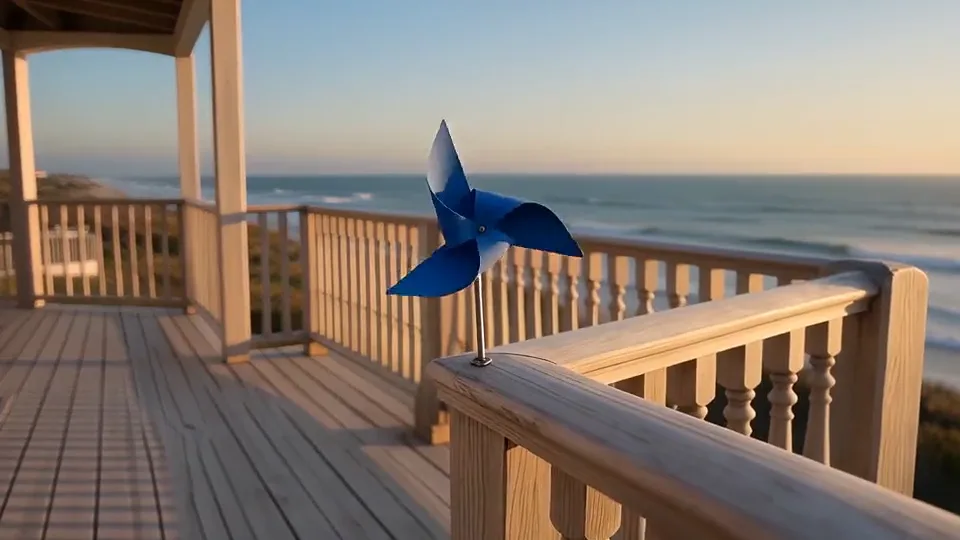
A pinwheel catches the coastal breeze

A short text-led shot gives one moving paper object room to turn.

Prompt

One continuous five-second close shot of a small cobalt-blue paper pinwheel turning slowly on a pale wooden balcony at sunrise. A light sea breeze spins its four folded blades while the camera makes a gentle push toward the pinwheel. Keep the central pin, blade shape and balcony railing consistent. Warm side light, soft distant coastline, tactile paper texture, restrained realistic motion. Quiet wind and distant waves, no music or speech. No cuts, people, text or logos.
A product in changing light

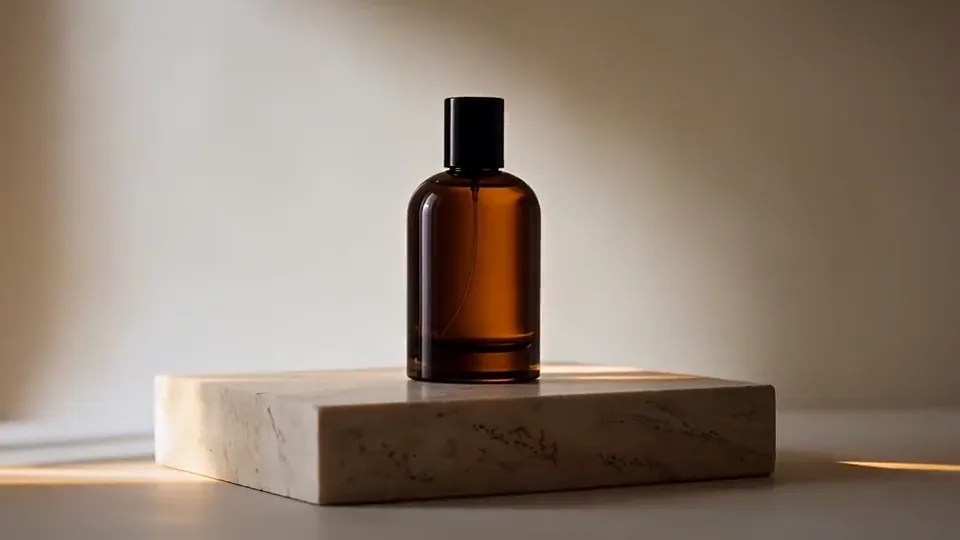
A single bottle stays in place while a narrow highlight moves across it.

Prompt

One continuous five-second product shot of a single amber glass perfume bottle standing on a low travertine plinth. A narrow band of morning sunlight slides slowly across the curved glass as the camera orbits a few degrees to the right. Keep the black cap closed, the bottle upright and the label area blank. Warm stone texture, soft cream background, natural contact shadow, no hands. Audio: quiet room ambience, no speech or music. No cuts, written words or logos.

Change the color, keep the motion

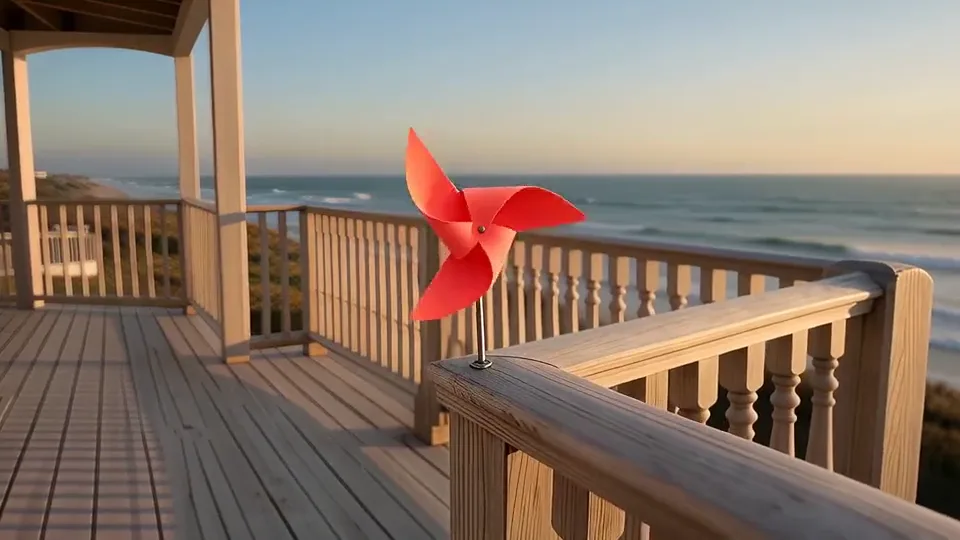
A Wan 2.7 Video Edit task revises the blue pinwheel source clip to coral red.

Prompt

Change the cobalt-blue paper pinwheel to a vivid coral-red paper pinwheel throughout the clip. Preserve its four folded blades, the same spinning motion, the wooden balcony, sea horizon, sunrise light, camera push and five-second timing. Do not add objects, people, text or cuts. Keep the quiet wind and distant waves.

Add your own 2–10-second source video in Video Edit. Recreate does not upload the example's source clip.

What is Wan 2.7?

Wan 2.7 is a video model in Alibaba's Wan family. This workspace brings three practical routes together: Generate a new shot from words or frames, guide a shot with reference media, or edit footage you already have. The input changes the job—not just the wording of the prompt.

Start with Generate when the scene is new. If its opening composition matters, prepare a still in GPT Image 2.0 and upload your own first frame. Choose R2V when references should guide the look or subject; choose Video Edit when the source clip's timing and movement should survive a specific change.

The examples above are short Wan 2.7 outputs made in this workspace. Compare what moved with what stayed steady. They show useful starting points, not a guarantee of identical results from another seed or source file.

Blue paper pinwheel turning on a balcony in a Wan 2.7 video
A frame from the paper-pinwheel scene; the video above shows the full rotation.

Wan 2.7 at a glance

The options below describe this site's current workspace, not every control offered by every Wan provider.
Wan 2.7 mode and output controls
ControlAvailable hereUse it for
ModeGenerate · R2V · Video EditNew scene, reference-guided scene, or source-clip revision
Generate inputsText; first and optional last frame; supported continuation video or audioChoose only the media that clarifies your brief
Resolution720p · 1080pReview or larger-screen output
Duration2–15s in Generate; source-led in Video EditGive the action enough time without padding the clip

Choose the mode before the prompt

The same sentence can ask for very different work depending on whether you bring frames, references or a source video.

Generate a new shot

Write a scene from scratch, or supply first and optional last frames to guide its beginning and ending. Describe the movement between those frames; an image alone does not specify a complete action.

Guide with references

R2V uses supported image and video references to help define a subject, look or motion. Say what each source contributes, then inspect the generated clip for changes you did not request.

Edit an existing clip

Video Edit starts from one 2–10-second MP4 or MOV source and an instruction. Ask for one identifiable change while naming the movement, framing or objects you want to keep.

From source material to a finished clip

  1. Pick the source

    Choose Generate, R2V or Video Edit. Upload only the compatible frames or media for that mode; an editing prompt needs your own source clip.
  2. Direct one change

    State the subject action, camera movement and what must remain stable. Set the output controls and review the live credit quote before generating.
  3. Watch the whole result

    Open the completed task in History or My Creation. Check the first and last frames, continuity and sound, then revise one instruction at a time.

A source clip, then a specific edit

An edit is easiest to judge when you can point to the original movement and the one thing you asked to change.
Blue paper pinwheel on a wooden balcony before the video edit
01 / Source movement

A blue pinwheel turns as the camera moves toward it.

Wan 2.7 edited frame of the paper pinwheel on the balcony
02 / Edited result

The instruction targets the pinwheel color while asking to retain its rotation and balcony setting.

Watch both clips above, not just these stills. Recreate loads the edit instruction but does not upload the source video for you. Keep your source file short and check the quote: Video Edit can bill for both input and output time.

Write a prompt the camera can follow

A useful brief separates the thing that changes from the things that should remain recognizable.
  1. 01

    One visible action

    Give a short clip a beginning and an end: a pinwheel turns, light crosses a bottle, or a hand sets down a cup.

  2. 02

    One camera move

    Choose a locked shot, push or restrained orbit. Name the subject that must stay in frame.

  3. 03

    A preservation list

    For edits and references, identify the shape, timing, background or motion that must not drift. Review rather than assume compliance.

A focused editing brief

“Change the blue paper pinwheel to coral red throughout the clip. Keep its four blades and spinning movement, the wooden balcony, sea horizon and camera push. No new objects or cuts.”

The request gives the model one change and several preservation checks. If the first take alters the setting, simplify the instruction before adding more style terms.

Wan 2.7 vs Wan 3.0

Choose by the workspaces available here, not an untested claim that one version wins every quality comparison.
Wan model workspace comparison
Choose byWan 2.7 hereWan 3.0 here
Primary routesGenerate, R2V, Video EditText, frames, references, File / Web
Clip length2–15 seconds; edit follows source unless customized2–30 seconds or Auto
Resolution720p or 1080p480p, 720p or 1080p
Distinct useExplicit existing-video editingLonger range and public URL inputs

Need to revise a clip while keeping its movement? Stay with Video Edit here. Need a longer new shot or public webpage input? Open Wan 3.0. Compare the two with the same brief and compatible inputs rather than judging from unrelated gallery scenes.

Three useful first tests

01

A short scene

Generate one small, visible action to check subject and camera motion without competing events.

02

A known identity

Use a reference only when a character, product or visual style needs an anchor; check the entire output.

03

A focused revision

Upload a short source and ask to change one material or color while keeping the original movement.

Wan 2.7 questions

Can Wan 2.7 create a video from text alone?

Yes. Choose Generate and enter a scene prompt. A first frame is optional; add one only when you already have a composition to animate.

What is the difference between R2V and Video Edit?

R2V guides a new clip with supported references. Video Edit changes an existing clip you upload. Select the mode before adding media so the workspace can validate the right inputs.

Can I use first and last frames?

Generate accepts a first frame and an optional last frame. Your prompt should describe the action connecting them. A gallery example does not upload its own source image for you.

How long can a Wan 2.7 clip be?

Generate offers 2–15 seconds here. Video Edit uses a 2–10-second source and normally follows its duration unless you choose a supported custom duration. Check the current controls before submitting.

Does Recreate upload the example source video?

No. It prepares the prompt and compatible settings, then focuses the workspace. For Video Edit, add a video you own or are permitted to use. Recreate itself does not generate or charge credits.

How are Wan 2.7 credits calculated?

The live quote depends on resolution, mode and billable seconds. Video Edit can include both source and output duration. Review that quote before Generate and see plans and credits for account options.

Choose Your Plan

Seedance 2.0Seedance 2.0Sora 2Sora 2Veo 3.1Veo 3.1Grok Imagine Video 1.5Grok Imagine Video 1.5KlingKlingNano BananaNano BananaGPT Image 2.0GPT Image 2.0Grok ImageGrok ImageElevenLabs TTSElevenLabs TTSSunoSuno
No hidden fees. Cancel anytime.
MOST POPULAR

Pro

$13$4.99/month equivalent

$59.88 billed annually

60% OFF vs Monthly

417 credits /month

+117 Bonus vs Monthly$0.012/credit
  • Access to all video models
  • Up to 6 Concurrent Tasks
  • At least ~416 images/month
  • Up to ~60 videos/month
  • At least ~52 songs/month
  • High Removing Stability
  • Priority customer support

Unlimited Generation Privileges

Free to generate, lower priority

  • GPT Image 2.01K/2K/4K30 Days Unlimited
  • NanoBanana Pro1K/2K/4K30 Days Unlimited
  • ElevenLabs TTS30 Days Unlimited
  • Suno30 Days Unlimited
BEST VALUE

Pro Unlimited

$70$39/month equivalent

$468 billed annually

45% OFF vs Monthly

2,500 credits /month

  • Access to all video models
  • Up to 10 Concurrent Tasks
  • At least ~2,500 images/month
  • At least ~357 videos/month
  • At least ~312 songs/month
  • Maximum Removal Stability
  • Priority customer support

Unlimited Generation Privileges

Free to generate, high priority

  • Seedance 2.0480P/720P
    Seedance 2.0 Fast10 Days Unlimited
    Seedance 2.0 Standard10 Days Unlimited
    Seedance 2.0 Mini10 Days Unlimited
  • GPT Image 2.01K/2K/4K365 Days Unlimited
  • NanoBanana Pro1K/2K/4K365 Days Unlimited
  • Sora 210 Days Unlimited
  • Sora 2 Pro10 Days Unlimited
  • Grok ImagineVideo 1.514 Days Unlimited
  • Kling 3.010 Days Unlimited
  • ElevenLabs TTS365 Days Unlimited
  • Suno365 Days Unlimited
ULTRA

Pro Ultra Unlimited

$174$58/month equivalent

$696 billed annually

66% Cheaper Than Competitors

3,750 credits /month

  • Access to all video models
  • Up to 20 Concurrent Tasks
  • At least ~3,750 images/month
  • At least ~530 videos/month
  • At least ~464 songs/month
  • Maximum Removal Stability
  • Priority customer support

Unlimited Generation Privileges

Free to generate, priority capacity

  • Seedance 2.0480P/720P
    Seedance 2.0 Fast30 Days Unlimited
    Seedance 2.0 Standard30 Days Unlimited
    Seedance 2.0 Mini365 Days Unlimited
  • GPT Image 2.01K/2K/4K365 Days Unlimited
  • NanoBanana Pro1K/2K/4K365 Days Unlimited
  • Sora 2720P365 Days Unlimited
  • Sora 2 Pro720P365 Days Unlimited
  • Grok ImagineVideo 1.5480P/720P365 Days Unlimited
  • Kling 3.0720P365 Days Unlimited
  • ElevenLabs TTS365 Days Unlimited
  • Suno365 Days Unlimited
MAX

Pro Max Unlimited

$249$199/month equivalent

$2388 billed annually

20% Cheaper Than Competitors

5,000 credits /month

  • Access to all video models
  • Up to 30 Concurrent Tasks
  • At least ~5,000 images/month
  • At least ~714 videos/month
  • At least ~624 songs/month
  • All Pro Unlimited features included

Unlimited Generation Privileges

365-day priority-capacity access

  • Seedance 2.0480P/720P
    Seedance 2.0 Fast365 Days Unlimited
    Seedance 2.0 Standard365 Days Unlimited
    Seedance 2.0 Mini365 Days Unlimited
  • GPT Image 2.01K/2K/4K365 Days Unlimited
  • NanoBanana Pro1K/2K/4K365 Days Unlimited
  • Sora 2720P365 Days Unlimited
  • Sora 2 Pro720P365 Days Unlimited
  • Grok ImagineVideo 1.5480P/720P365 Days Unlimited
  • Kling 3.0720P365 Days Unlimited
  • ElevenLabs TTS365 Days Unlimited
  • Suno365 Days Unlimited

Buy More Credits

Add one-time credit packs anytime. Existing subscription benefits remain unchanged.

Basic

$29.90

ONE-TIME • No recurring charges

2,000 credits$0.0149 / Credit
Base rate
28% OFF

Standard

$69.90

ONE-TIME • No recurring charges

6,500 credits$0.0108 / Credit
42% OFF

Ultra

$199.90

ONE-TIME • No recurring charges

23,000 credits$0.0087 / Credit