
A useful 1980s photo prompt tells the image model what to keep, where the photograph belongs, and how it should be lit. “Make me look eighties” leaves all three open to interpretation. You might get a convincing jacket—and someone else’s face.
Start with the copy-ready portrait prompt below, then choose a scene that suits your source photo. If you would rather begin with a picture, open our 1980s photo prompt gallery: it lets you choose a brief and carry it into the image workspace. You can try generating with available free credits, subject to your account’s eligibility and balance; check the displayed credit quote before submitting.
The examples here were made with GPT Image 2.5 Flare in RSW AI Studio, using text-only prompts and fictional people. They show the intended style, not verified before-and-after edits of real faces. Each example includes an adapted prompt for your photo and, where different, the exact prompt behind the illustration. No competitor images have been reused.
A ChatGPT 80s photo prompt to start with
Use a clear head-and-shoulders or waist-up photo. This first brief aims for a restrained 1985 studio portrait: a plain jacket, painted backdrop and soft light. It does not ask the model to turn you into a teenager or replace your hair completely.
Restyle the person in my uploaded photo as a portrait photographed in 1985. Retain their face shape, eye spacing, nose, expression, skin tone and apparent age. Keep the original head angle and shoulder position. Change the outfit to a plain cotton shirt and softly structured jacket, with a muted blue-gray painted studio backdrop. Keep the hairstyle recognizable, adding only modest volume. Use broad, soft portrait light, a small warm color shift and fine film grain. Leave skin texture visible. Make one color photograph, with no caption, date stamp, decorative border, modern accessories or exaggerated aging. Change the styling, not who the person is.
Copy the text into an image-capable ChatGPT conversation with your photo attached, or use the button to prepare it in our GPT Image 2.5 workspace. The button transfers text only: it does not upload a photo, submit a generation or spend credits.
For a stronger yearbook look, replace the backdrop sentence with “Use a dark blue school-portrait backdrop with a subtle geometric pattern.” Leave the rest alone for the first attempt. If you change the hair, lighting, camera angle and outfit at once, it becomes harder to tell which change caused a disappointing result.
How to make an 80s photo from your own picture
1. Match the original to the intended crop. A close selfie is a reasonable starting point for a studio headshot. It gives the model much less information for a full-length bowling-alley photograph. For a couple or family, choose one clear group image with everyone at a similar distance from the camera. Use photos you have permission to edit, and avoid uploading unnecessary personal details in the background.
2. Attach the photo and choose one brief. In ChatGPT, open an image-capable conversation, attach the source and ask for the edit in the same request. In RSW AI Studio, paste or transfer the prompt, then use Reference images to attach your photo. Review any references already in the workspace; an unrelated old upload can point the model toward the wrong person or room. Available controls and account limits can differ between services.
3. Review the settings before generating. A portrait usually suits 3:4; two people can work well in a square; a group plus its surroundings benefits from a landscape crop. Start with one image and a modest resolution. Choose the model you want, inspect the credit quote and submit only when the reference and prompt agree. GPT Image 2.0 is another workspace option; its controls and quote are shown on that page.
4. Compare the result with the source, not just with the mood board. Check faces, apparent age, complexion, hands and the number of people. Then check the setting. A small smartphone on a table can undermine an otherwise convincing period scene. Download a result only after that inspection, and label it as AI-created when sharing it as a throwback so it is not mistaken for a genuine family photograph.
OpenAI’s image-generation documentation describes both image creation and editing from image inputs. That capability is not a promise that every facial detail or requested edit will remain exact.
Seven looks, from a studio portrait to an empty video shop
The starter above is look one. The six examples below move beyond the studio. Pick the setting that matches the photo you already have rather than forcing every subject into the same costume. An eighties family album, a rain-washed veranda and a neon fantasy can all be enjoyable, but they are different visual briefs.
| Your source | Start with | Watch for |
|---|---|---|
| Head-and-shoulders portrait | 1985 studio starter | Overdone hair or younger-looking face |
| Waist-up portrait, hands visible | Record counter | Hands and sleeve lettering |
| Two people standing together | Cinema at dusk | Face separation and relative height |
| Seated family or friends | Kitchen or lakeside cabin | Missing people and overlapping limbs |
| Standing portrait in soft light | Monsoon veranda | Unwanted changes to skin tone |
| No personal photo | Empty video shop | Invented lettering and room geometry |
2. A record-shop portrait with window light
This is the quieter alternative to a neon arcade. In the example, the cardigan, wooden counter and record racks establish the setting; the left-hand window does most of the lighting work. The face does not need a heavy brown tint to make the image feel less contemporary.
Choose a reference that already shows both hands if you want this composition. When adapting the brief, change the cardigan color or light direction first. Asking the person to hold a cassette adds another small object and another opportunity for awkward fingers.
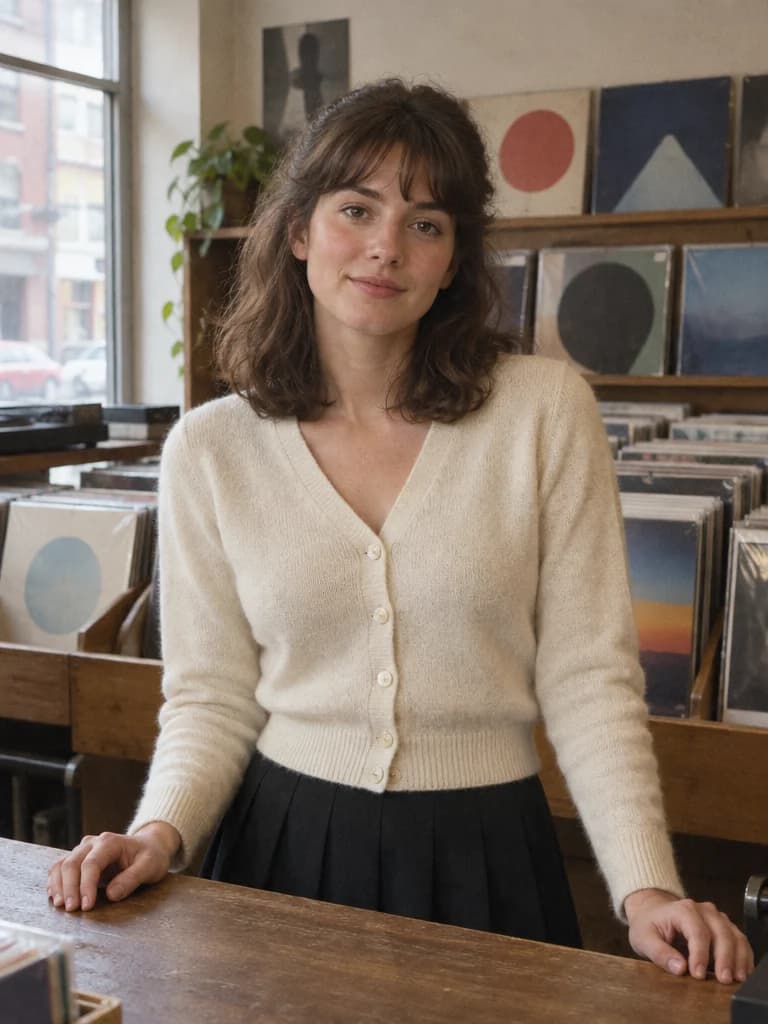
What to inspect: The soft window light keeps the face readable. The two hands remain separate, but the racks still deserve a close look for stray marks.
Adapted prompt · upload your own photo
Use my uploaded waist-up portrait as the reference. Keep my face, complexion, age, head angle and natural proportions. Place me behind a small record-shop counter in 1983, wearing an ivory cardigan over a plain top. Keep both hands visible and separate on the counter, holding nothing. Let daylight enter from the left; use a gently warm color-film finish with light grain, not a yellow wash. Put abstract, unlettered record sleeves on the racks behind me. No readable lettering, brands, extra people or modern electronics. Keep the scene quiet and ordinary rather than turning it into a fashion advertisement.
Exact prompt used to generate this fictional example
This is the original text-only production prompt, not a record of editing a real person’s photograph.
Create a fictional adult woman, alone; she does not depict a real person. Set the photograph at the counter of a small record shop in 1983. Use an ivory knit cardigan and a dark pleated skirt. Frame from the waist up with both relaxed hands separately resting on the counter. Put plain, abstract record sleeves without lettering in racks behind the person. No cassette in the hands and no patterned shirt. Use soft shop-window daylight, a slight warm color shift and fine grain; retain subtle skin texture. Make one ordinary color-film photograph, not a collage, poster or heavily distressed print. Keep fine grain, readable faces where present, natural anatomy and restrained period colors. No readable text, pseudo-lettering, logos, watermarks, borders, modern phones, smartwatches or contemporary screens. Album-like realism, not an assertion that this is an archival photograph.
3. A couple outside the cinema
A 1980s couple photo prompt needs instructions for two people, not a singular “keep my face.” Preserve their order and relative height, and resist describing a new pose that hides one person behind the other. The example uses a small gap between the faces and brighter foreground light against dusk.
Matching jackets are a stylistic choice here, not a requirement. Substitute two different outfits if that feels more like your photo. Keep the ticket window plain: the scene does not need an invented film title to explain where the couple are standing.
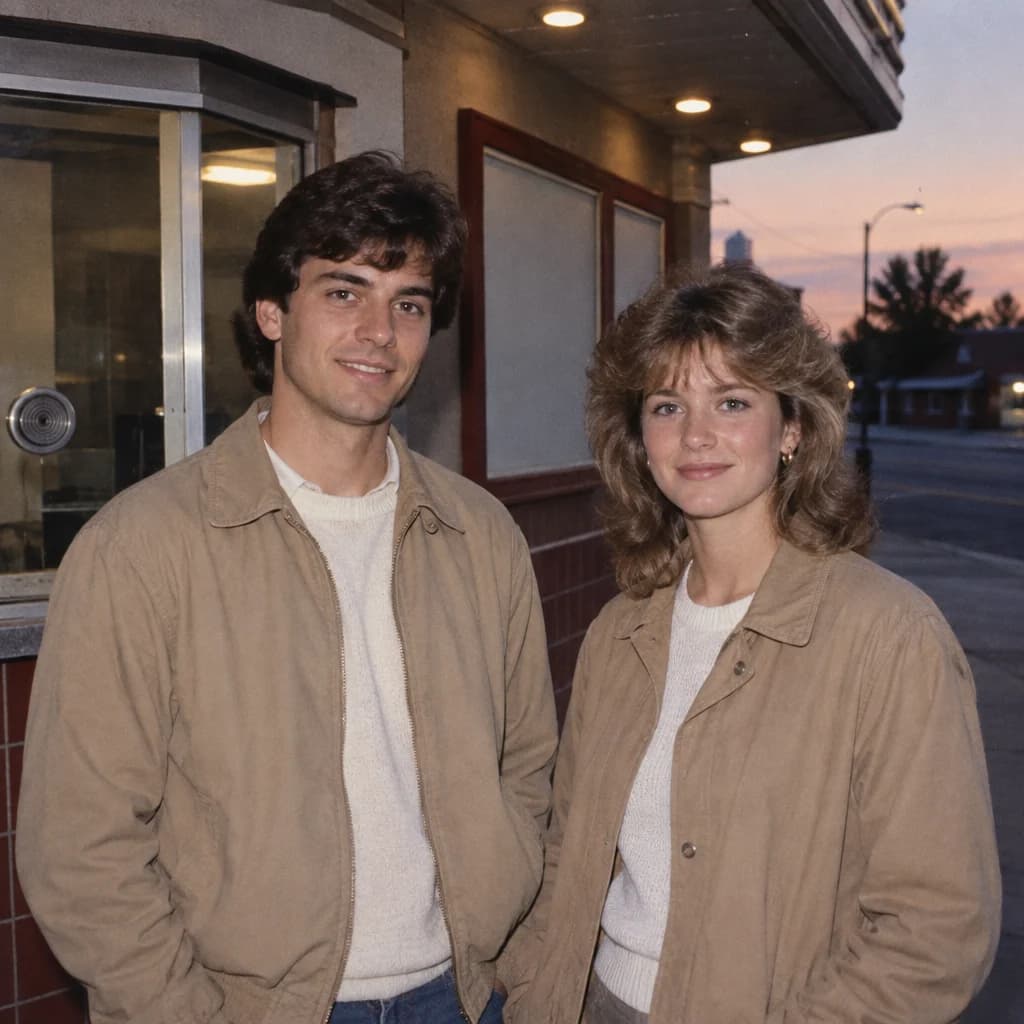
What to inspect: Both faces are at a useful scale. This framing hides most of the hands, so it does not demonstrate that the model followed the hand instruction perfectly.
Adapted prompt · upload your own photo
Restyle the two people in my uploaded photo as a couple outside a neighborhood cinema in 1986. Keep both distinct faces, skin tones, apparent ages, relative heights and left-to-right order. Frame both from the waist up with a natural gap between their faces. Use simple tan jackets and a plain ticket-window background. Light the faces with restrained camera flash against softer dusk light. Keep hands relaxed and empty. Use subtle color-film grain and realistic skin texture. No extra people, invented film titles, text, logos or dramatic wedding poses.
Exact prompt used to generate this fictional example
This is the original text-only production prompt, not a record of editing a real person’s photograph.
Create exactly two fictional adults as a couple, with distinct faces and no other people. Set the photograph beside a small-town cinema ticket window in 1986. Use simple tan jackets over light-colored tops. Show both subjects side by side from the waist up, faces separated and equally clear, hands relaxed without tickets or embracing poses. Mix gentle dusk ambient light with restrained on-camera flash. The ticket window and any poster panels are plain and unlettered. Do not include film titles, brand marks or detailed ticket text. This is outside a cinema, not a studio, arcade or wedding. Make one ordinary color-film photograph, not a collage, poster or heavily distressed print. Keep fine grain, readable faces where present, natural anatomy and restrained period colors. No readable text, pseudo-lettering, logos, watermarks, borders, modern phones, smartwatches or contemporary screens. Album-like realism, not an assertion that this is an archival photograph.
You can find these briefs alongside other retro photo examples in the gallery. Choose one, add your own reference and check the quote. Eligible free credits can cover a generation when the available balance is sufficient; repeated attempts are not automatically free.
4. An everyday family breakfast
A family photo does not need balloons, formal clothes or a painted studio backdrop. This kitchen scene uses a table, toast and cupboards to suggest an ordinary morning. The wider framing matters: crop too tightly and the setting becomes a row of faces with no sense of home.
The illustration contains four fictional people. Your prompt should preserve the number in your reference, even if it differs. Check each person separately, especially the smaller faces. Keep ordinary clothing appropriate to the people in the original rather than importing the example family’s ages or appearance.
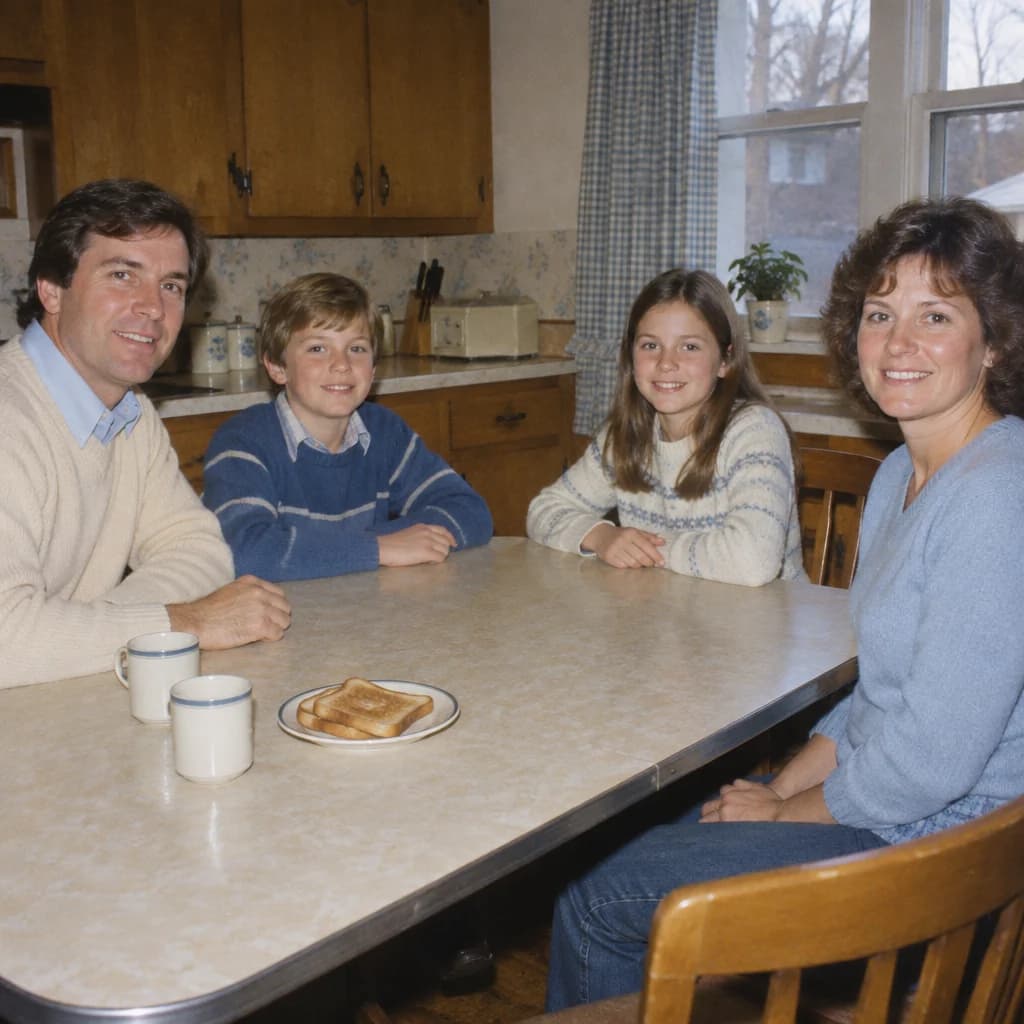
What to inspect: The everyday cupboards and flash make this feel like a snapshot. Check every family member individually; a convincing group is not proof of a reference-face match.
Adapted prompt · upload your own photo
Turn my uploaded family photo into an ordinary kitchen snapshot from 1982. Keep the exact people, their separate faces, skin tones, ages and relative positions; do not add a generic family. Place them around a breakfast table with every face visible. Use everyday cream and muted-blue clothes, wooden cupboards, a window, two plain cups and a small toast plate. Keep the hands simple and separated. Use direct camera flash and a mild warm film cast. Leave room around the group so the kitchen is visible. No cake, decorations, captions, modern screens or heavy scratches.
Exact prompt used to generate this fictional example
This is the original text-only production prompt, not a record of editing a real person’s photograph.
Create a fictional family of exactly four: two adult parents and two school-age children. All are fully clothed in ordinary everyday clothes, with four distinct unobstructed faces. Make a 1982 home-kitchen snapshot. Arrange the group along two sides of a rectangular breakfast table so every face is visible; leave some kitchen cabinets and a window in the frame. Put a modest toast plate and two plain ceramic cups away from the center foreground. No cake, candles, streamers or birthday decorations. Use cream and muted blue casual cotton clothing, simple hands resting separately on the table or laps, and natural glances toward the camera. Direct flash, warm household colors and slightly imperfect everyday framing, not a tightly cropped celebratory portrait. Make one ordinary color-film photograph, not a collage, poster or heavily distressed print. Keep fine grain, readable faces where present, natural anatomy and restrained period colors. No readable text, pseudo-lettering, logos, watermarks, borders, modern phones, smartwatches or contemporary screens. Album-like realism, not an assertion that this is an archival photograph.
5. A monsoon veranda, not a generic “Indian retro” filter
For an Indian 1980s photo prompt, describing a place and an everyday situation is more useful than adding a pile of film-star references. Here, the tiled roof, wooden door and wet courtyard supply the context. Soft overcast light gives it a different atmosphere from the flash-lit kitchen.
The fictional example depicts a South Asian woman. That is not an instruction to change the ethnicity of the person in your upload. Keep your own identity and choose clothes appropriate to you. If you want a film-magazine portrait instead, write a separate studio brief; combining bridal ornament, monsoon weather and glamour lighting muddies this particular scene.
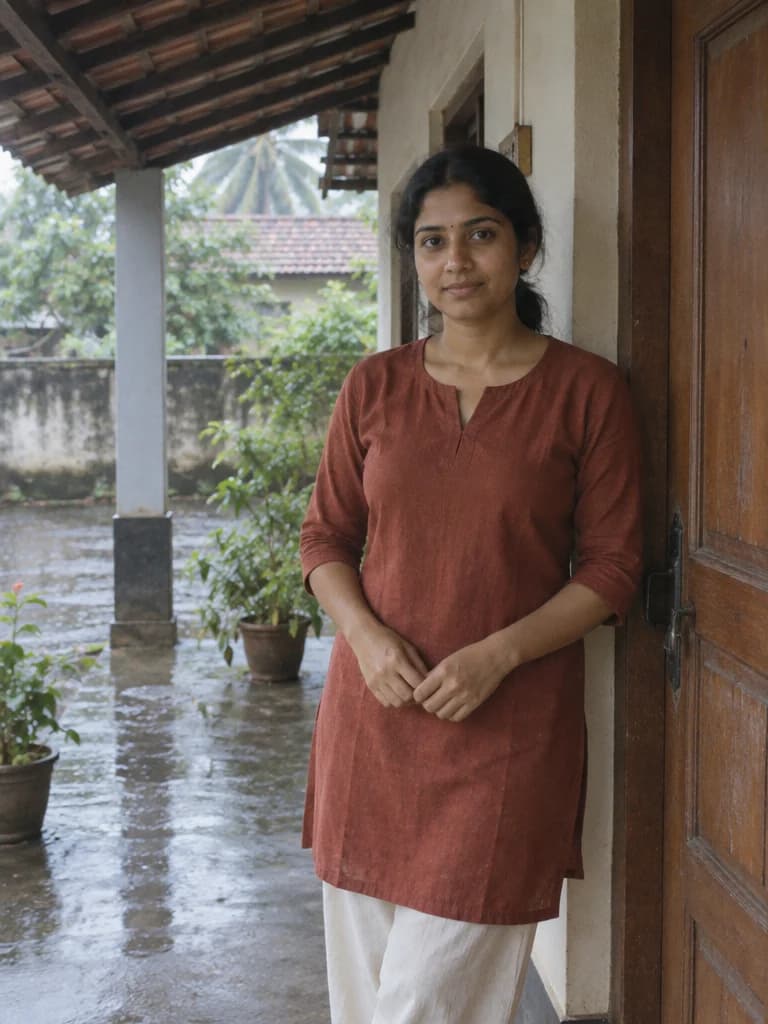
What to inspect: The subject stays beneath the roof while rain belongs in the background. Keep skin color neutral when adapting the prompt to your own photo.
Adapted prompt · upload your own photo
Use the person in my uploaded standing portrait as the identity reference. Preserve their face, ethnicity, complexion, age and body proportions. Place them beneath a tiled veranda beside a wooden door in a South Asian home in 1985. Use an understated rust-colored cotton tunic and cream trousers; adapt the fit naturally to the person. Keep them dry under the roof while the courtyard beyond is rain-wet. Light the scene with soft overcast daylight, neutral skin tones and a restrained color-film texture. No bridal jewelry, studio backdrop, heavy orange tint, text or modern devices.
Exact prompt used to generate this fictional example
This is the original text-only production prompt, not a record of editing a real person’s photograph.
Create one fictional adult South Asian woman, not a depiction of a real person. Photograph a covered veranda of a South Asian home in 1985. The person stands beside a wooden door wearing a simple rust-red cotton tunic and cream everyday trousers, without bridal ornament. Frame from the knees up. Keep the person sheltered and dry, with a damp courtyard visible behind them. Use soft overcast daylight, natural skin tones and subdued color. No teal silk sari, jasmine flowers, seated pose or painted studio backdrop. This is ordinary home life, not a wedding costume. Make one ordinary color-film photograph, not a collage, poster or heavily distressed print. Keep fine grain, readable faces where present, natural anatomy and restrained period colors. No readable text, pseudo-lettering, logos, watermarks, borders, modern phones, smartwatches or contemporary screens. Album-like realism, not an assertion that this is an archival photograph.
6. Friends on a lakeside holiday
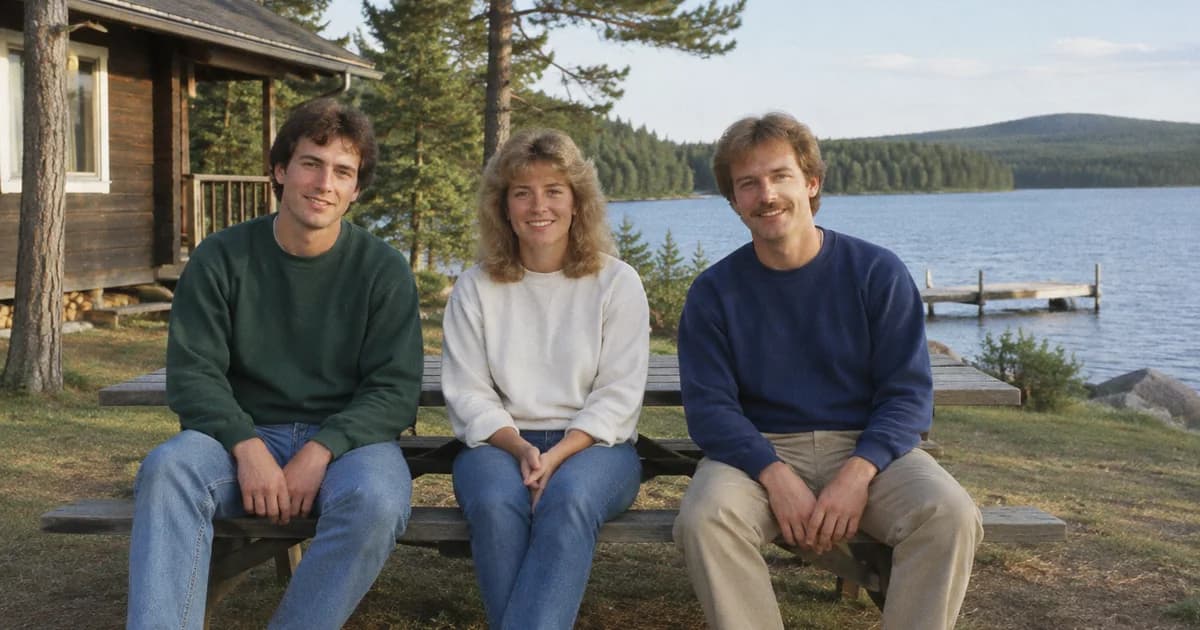
This landscape example leaves room for a cabin and lake while keeping the three faces readable. It illustrates a useful compromise for a group-photo prompt: a place should support the people, not shrink them into the distance.
Start with a seated group if you can. Asking the model to rearrange standing friends onto a bench requires it to invent body positions as well as the new setting. Keep hands on laps and avoid overlapping arms for the first attempt; add more elaborate gestures only if you need them.
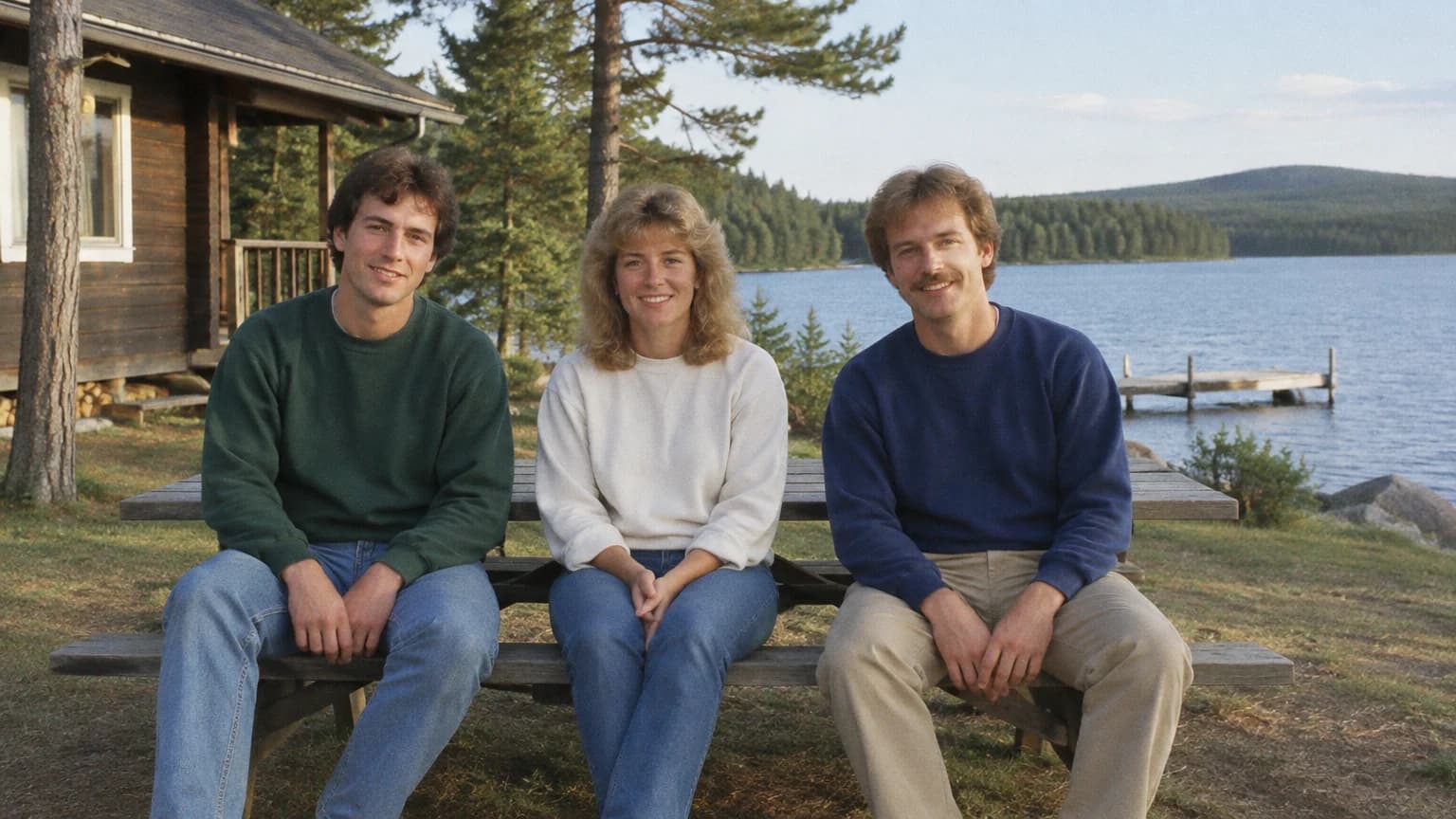
What to inspect: All three faces stay reasonably large. More scenery would reduce that clarity, so do not keep widening the frame just to fit another tree.
Adapted prompt · upload your own photo
Recreate my uploaded group photo as a casual lakeside holiday photograph in 1984. Preserve the actual number of people, each separate face, skin tone, age, relative size and left-to-right order. Seat the group on a wooden picnic bench near a cabin, with relaxed hands and small gaps between bodies. Include some lake and trees but keep every face large enough to recognize. Use plain sweatshirts, ordinary afternoon daylight and fine color-film grain. No extra visitors, overlapping arms, sunset spectacle, captions or logos. Make one landscape photograph, not a collage.
Exact prompt used to generate this fictional example
This is the original text-only production prompt, not a record of editing a real person’s photograph.
Create exactly three fictional adult friends, with three separate clear faces and no other people. Photograph friends seated with small natural gaps on a picnic bench outside a wooden lakeside cabin in 1984. Use simple sweatshirts and everyday trousers, with separate relaxed hands on laps. Include some cabin, lake and open surroundings in a wide ordinary travel-album frame. Use late-afternoon natural light without a dramatic sunset. No extra passersby, complex embraces or overlapping arms. Keep all faces at a readable scale, not tiny distant figures. Make one ordinary color-film photograph, not a collage, poster or heavily distressed print. Keep fine grain, readable faces where present, natural anatomy and restrained period colors. No readable text, pseudo-lettering, logos, watermarks, borders, modern phones, smartwatches or contemporary screens. Album-like realism, not an assertion that this is an archival photograph.
7. An empty video shop—and a revision worth showing
Not every 80s look prompt needs a face. A quiet video-rental shop can work as a retro background or an illustration for a story. It is also a useful reminder that a pleasing image is not necessarily a faithful response to the prompt.
Our first text-only attempt asked for unlettered tape cases. The light and room looked convincing, but the shelves still contained tiny label-like marks. We did not use that image as the final gallery cover.
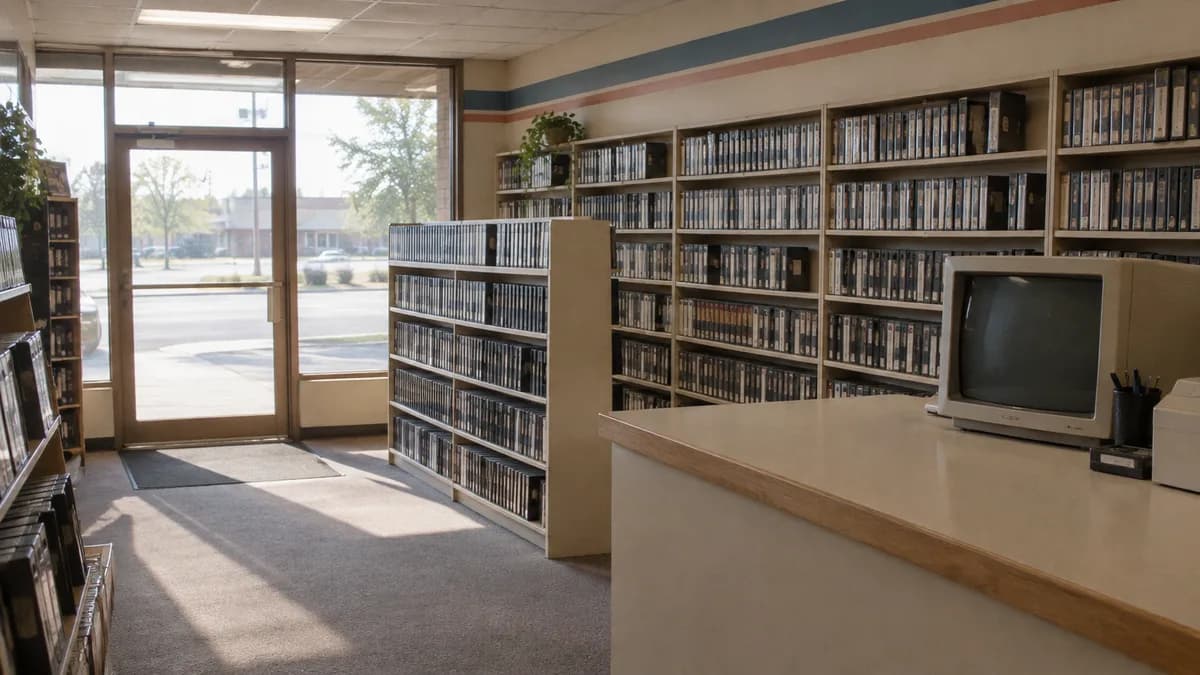
For the second generation, we added a concrete replacement: solid-color navy, gray and cream plastic cases, with no label, sticker, paper insert, stripe or tiny glyph-like mark. The revised image below has cleaner shelves. The composition changed too: this was a new text-only generation, not a controlled edit of the first image.
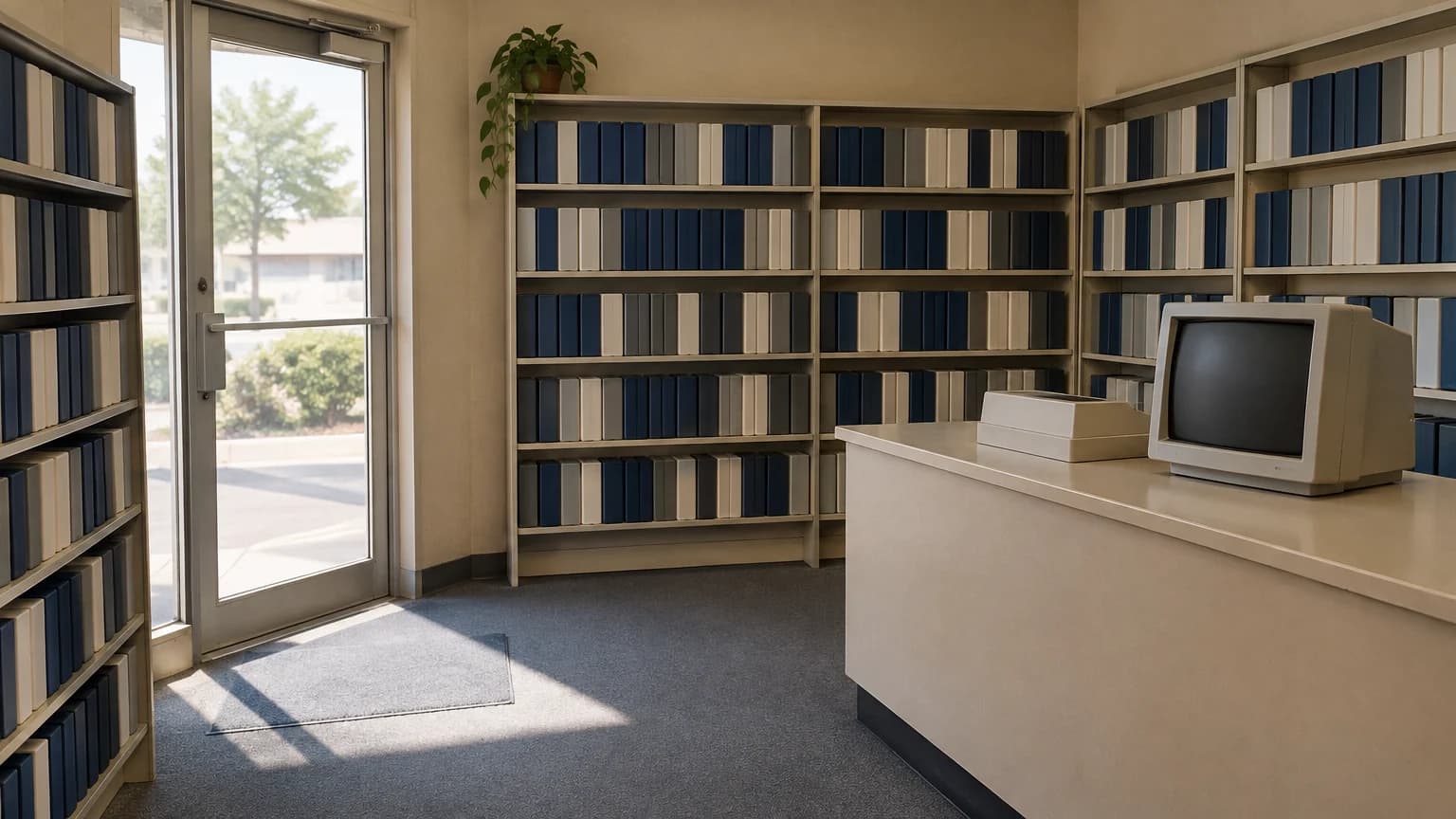
What to inspect: The blank packaging meets the revised brief, but it makes the store less visually specific. That trade-off was preferable to publishing invented lettering.
Exact example prompt · no photo needed
Create an invented empty interior with absolutely no people, faces, portraits or human reflections. Make an eye-level photograph inside a small video-rental shop in 1988. Show orderly shelves of plain unlettered videotape cases, a beige counter and a switched-off CRT monitor with a dark screen. Morning light enters through a glass door. Use believable room geometry, slight warmth and fine ordinary color-film texture. No readable labels, film-cover artwork, brand names, modern equipment or figures outside the door. Avoid a cinematic poster treatment. Make one ordinary color-film photograph, not a collage, poster or heavily distressed print. Keep fine grain, readable faces where present, natural anatomy and restrained period colors. No readable text, pseudo-lettering, logos, watermarks, borders, modern phones, smartwatches or contemporary screens. Album-like realism, not an assertion that this is an archival photograph. Critical correction: every videotape case must be a completely solid-color, blank plastic case, with no spine label, sticker, paper insert, symbol, stripe, illustration, lettering or tiny glyph-like marks. Use uniformly blank navy, gray and cream cases. The CRT bezel, counter and door must also have no labels or logos. Prioritize these truly blank surfaces over conventional video-shop packaging detail.
There is a trade-off. Blank cases make the room look less like a fully stocked rental shop, but they avoid distracting fake packaging. If legible titles are essential to your design, add your own text in an editor after generating rather than expecting a shelf full of tiny labels to be flawless.
What to change when the result misses
Do not respond to every problem with “more realistic, more detailed.” First name the part that is wrong. These are suggested revision instructions, not guaranteed fixes. If your tool needs an image attached for an edit, include the relevant source or result rather than sending a context-free sentence.
The face looks like someone else. Return to the original photo, reduce changes to hair and pose, and ask for a more restrained restyle:
Use the original uploaded photo as the face reference again. Keep its facial proportions, expression, skin tone and apparent age. Leave the head angle and hairstyle close to the source. Change only the jacket, backdrop and photographic finish. Do not replace the person with a generic retro portrait.
The photo is too orange or too damaged. Color shift, grain and wear are separate choices. Keep fine grain but remove the heavy treatment:
Keep the scene and people unchanged. Reduce the orange cast and restore natural skin tones. Retain only fine film grain and mild print softness. Remove heavy scratches, torn edges, stains and exaggerated blur. The photograph should look like a clean color print, not a damaged antique.
A family member disappears or merges with another. Use a clearer group reference and simplify the pose. Identify people by their positions—left, center, right—rather than a long clothing description. Ask for the original count, with separated faces and hands. Do not keep regenerating a complex group without checking which person is drifting.
The result turns into cyberpunk. Remove terms such as “neon grid,” “futuristic” and “cinematic city.” Specify a normal room, shop or street with ordinary daylight or camera flash. A synthwave image is a stylized interpretation; it is not the same target as an everyday family-album photograph.
Is there one official prompt for the 1980s AI photo trend?
Treat an “80s photo prompt” as a creative brief, not a password that unlocks one fixed filter. Public examples use different settings, crops and lighting. The starter in this article is our own wording; it is not presented as an official ChatGPT template. Adapt it to the picture you actually want.
Can I use these prompts in ChatGPT and RSW AI Studio?
The instructions are written in plain English and can be used with image tools that accept the relevant text and reference inputs. Results and controls will differ. Our example images were generated in RSW AI Studio with GPT Image 2.5 Flare; we have not run a matched ChatGPT-versus-RSW comparison or verified these photo-edit variants on real people.
Can I generate an 80s photo for free?
The prompts are free to read and copy. In RSW AI Studio, generation uses the credit quote shown in the workspace. If your account is eligible for free credits and has enough available, you can use those credits to try it. Check your balance rather than assuming every model, resolution or retry is free. ChatGPT has its own account limits.
Should I add a date stamp?
Only if you want one. We leave stamps out so they do not distract from the photograph or suggest it is a genuine archival image. For a personal layout, adding a clearly intentional date or caption afterward also gives you better control over spelling and placement.
How were these examples made?
On September 15, 2026, we generated the source set in the main-site workspace with GPT Image 2.5 Flare: one image per request, 1K, Medium quality, PNG, opaque background and no reference uploads. This article selects six of those results and includes the rejected first video-shop attempt. The public versions are compressed WebP files. The fictional examples demonstrate text-to-image styling only; requests to preserve a real person’s face still need their own review.
Keep the first experiment small: one suitable photo, one setting and one clear brief. Choose a 1980s photo prompt, prepare it in the workspace and inspect the result before making the next change.