
Keyframe Video Prompt Planning: Six Briefs to Prepare for Kling 4.0
A good video prompt is a small production plan, not a pile of adjectives. The rumored Kling 4.0 interface shows first, middle and last frame slots, but we have not verified a public 4.0 keyframe API. You can still do the useful part today: decide what changes, what stays stable, and what the viewer should understand at each beat. These briefs are model-independent planning examples; the linked videos were made on our site with existing Kling 3.0 models, not Kling 4.0.
Start with a shot map, not a maximum-length paragraph
Write four short lines before you add style:
- Subject and action: the one thing the viewer follows.
- Camera: locked, tracking, pushing, orbiting—choose one primary move.
- Anchors: shape, face, product, set or lighting that must remain consistent.
- End state: what should be visibly different by the last frame.
For a future multi-keyframe workflow, each frame should clarify a meaningful state change. Ten near-identical pictures add little control. Ten contradictory pictures may make a scene impossible to reconcile. We would rather plan three clear beats and expand only when the verified model actually needs them.
| Planning asset | Its job in the brief | Check before upload |
|---|---|---|
| Opening still | Establish subject, composition and lighting | Is the focal point unmistakable? |
| Middle still | Show a meaningful transition or camera position | Does the subject remain identifiable? |
| Ending still | Define where the action resolves | Can the path from the start plausibly reach it? |
This is a storyboarding method, not a claim that Kling 4.0 currently accepts three frames—or that its eventual API will use those names. Store the stills and their intended roles separately so you can adapt to whatever input contract is actually released.
Brief 1: a person and an atmosphere
Our first Kling 3.0 example uses a woman in a mustard raincoat, a warm window, rain in the foreground and a restrained camera push. The movement is small—a turn toward the light—so the brief can spend its detail budget on face consistency and believable reflections.
Shot map: start facing away from the light; middle, turn gently; end, hold a stable face as rain catches the reflection. Preserve the coat color and window position. This is a better test of continuity than asking for five unrelated cinematic events.
Adaptable brief, not the exact prompt used for the video above: “One continuous medium shot beside a rain-covered window. A person in a mustard coat turns slowly toward warm interior light. The camera pushes in only slightly. Keep the same face, coat and window position from start to finish; let rain and reflections change naturally. No cut or new subject.” When reviewing, pause near the turn: that is where facial identity and reflected geometry are most likely to drift.
Brief 2: a product that stays put
A still amber perfume bottle can expose camera drift immediately. Ask for a short lateral slide while the bottle, cap and plinth remain fixed. If the label or silhouette changes, the take fails even when the lighting is beautiful. A first-frame photograph is helpful, but it should be treated as your reference, not silently uploaded from a gallery card. The Kling 3.0 Turbo workspace is where you can test a suitable first-frame brief now.
Adaptable brief: “Use my bottle photograph as the opening composition. Move the camera slowly from left to right; do not rotate the bottle. Keep the black cap shut, the amber glass shape and the label layout unchanged. A soft reflection may travel across the surface. End with the full bottle in view.” Make a separate first-frame still from your own asset. Do not treat the image on a product page as permission to upload it.
Brief 3: a subject crossing the frame
For a cyclist moving left to right, pair a single travel direction with a camera that tracks at the same pace. Keep the full bicycle visible. The site-generated coastal example shows why a simple directional brief can teach more than a long list of lens names.
Adaptable brief: “A single rider travels left to right along a quiet coastal path at sunrise. The camera moves parallel at the rider's speed, low enough to see the whole bicycle and its contact with the ground. The sea stays behind the rider. One take, steady pace, no sudden cut.” A frame plan would mark departure, mid-path and exit—not three unrelated poses. Check that the wheel, handlebars and jacket remain continuous.
Brief 4: layered miniature depth
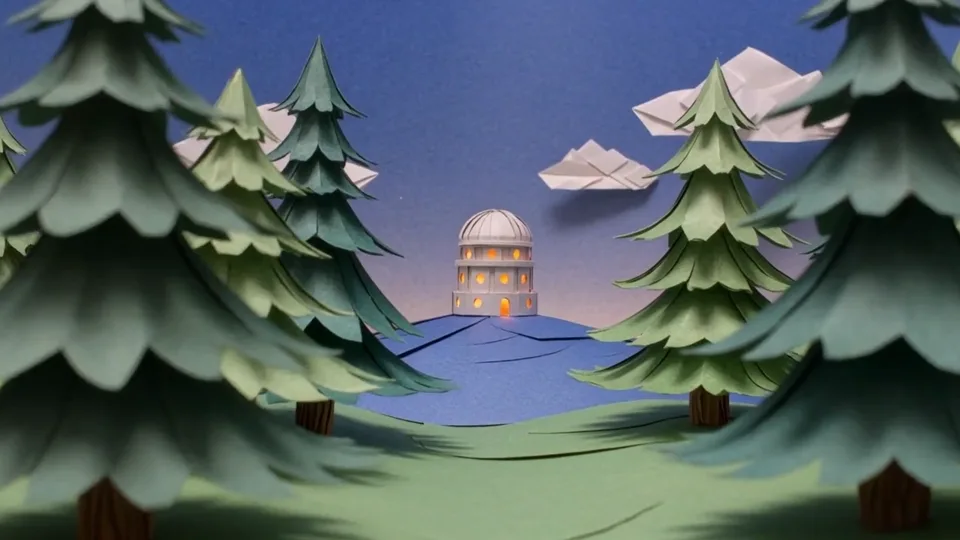
The paper observatory study separates three planes: nearby paper trees, the lit building, and the sky. A gentle push between foreground elements reveals parallax without asking the model to redesign the observatory.
Adaptable brief: “A small paper observatory glows on a hill under a deep-blue dusk sky. Push slowly through nearby paper trees toward the entrance. Keep the building's roof, circular windows and position fixed; let the close trees move faster across the frame than the distant building. No added structures.” The key visual test is parallax. If both tree and building slide together as a flat card, the depth idea has not come through.
Brief 5: one clear object action
A paper sailboat crossing a pond is a useful test of object identity. Specify the paper hull and sail as invariants, then describe ripples and a low tracking camera. The action has an obvious beginning and end; no narration is needed.
Adaptable brief: “One blue folded-paper sailboat crosses a shallow pond from left to right. Keep its fold lines, sail and hull intact. Small ripples touch the paper without changing its shape. A low camera follows at water level and stops as the boat reaches a sunlit patch.” The intended end frame is not a different boat in a new scene; it is the same object at a new position.
Brief 6: minimal motion from a reference image
A still room with a lifting curtain tests whether an image-to-video workflow can preserve furniture, wall details and the daylight direction while moving only the fabric. It is a good first-frame experiment because the unwanted changes are easy to spot. Supply your own image when you actually run such a test; viewing our example does not transfer its source image into your workspace.
Adaptable brief: “Beginning with my room photograph, a gentle breeze lifts only the sheer curtain. Keep the chair, table, wall art and camera position unchanged. Daylight stays soft and comes from the same window. Finish when the curtain settles.” Compare the first and final frames side by side. If furniture shifts, simplify the motion before adding new camera instructions.

The illustration above was made with Qwen Image 3.0 as a still planning aid. It is not a Kling video frame or evidence that an unreleased 4.0 model follows keyframes. Its value is the visible sequence: each beat changes the scene while keeping an identifiable subject.
A reusable prompt template
One continuous [duration] shot of [subject] doing [single action] in [setting]. The camera [one movement]. Start with [first state], then [middle state], and finish with [end state]. Keep [identity or composition anchors] unchanged. [Light and material details]. [Audio if supported]. No unwanted text, logos or cuts.
Check the whole result, not just the thumbnail
Before spending another generation, watch the full clip and note the first time something goes wrong. Did the subject change identity? Did the camera cut when a continuous move was requested? Did the end state arrive too early for the chosen duration? For reference-led shots, compare the source still with several points in the result; for a text-only shot, check motion and continuity rather than expecting an exact unseen image. Change one instruction at a time so the next attempt answers a specific question.
If the model offers native sound on the actual route, describe one concrete sound cue only when it helps the scene. A rainy window may need quiet rain; a silent product study may not need a soundtrack. Do not request audio merely because a preview screenshot mentions it. Keep a note of the setting and price shown in the live workspace before generating.
Use only the parts the live model accepts. If a future Kling 4.0 API does not offer middle-frame input, do not invent a control to match a screenshot. If it does, test whether the actual frame ordering and timing follow this plan. Our preview page collects the six real example prompts in one place, while the API availability checklist explains when it is safe to call a future 4.0 implementation live.