
Kling 4.0 vs Kling 3.0: A Comparison You Can Use Before Release
“Kling 4.0 vs Kling 3.0” sounds like a routine spec table. Before a public 4.0 API, it is really a comparison between a working product and a preview hypothesis. That matters if you have a deadline, a budget, or a production pipeline. We can tell you what the Kling 3.0 workspace does here; we cannot responsibly claim that 4.0 is faster, sharper or cheaper without actual 4.0 outputs.
The comparison, with evidence labels
| Question | Kling 3.0 / 3.0 Turbo on our site | Kling 4.0 |
|---|---|---|
| Can you submit a task? | Yes, using the live workspaces | No verified 4.0 API here |
| Can you see a quote? | Yes, before generation | No verified 4.0 price |
| Can you inspect original results? | Yes, including six clips on our preview page | No 4.0 clips on our site |
| What about 4K? | Kuaishou publicly reported native 4K for the Kling 3.0 series; settings vary by route | Final 4.0 output tiers unverified |
| Are longer clips/keyframes available? | Check each live mode in the workspace | Preview imagery suggests possibilities; not a documented API contract |
| Best use today | Ship and iterate on a real brief | Research and subscribe for an availability update |
The 3.0 4K point comes from Kuaishou’s interim 2026 release. It is especially important because some 4.0 comparisons imply that 4K itself would be a new 4.0 feature. Attributing an established 3.0 capability to an unreleased model makes the comparison less useful.
Compare tasks before comparing marketing claims
The most useful question is not “which number is larger?” but “which workflow can finish this specific job?” A product bottle needs shape and label stability; a character shot needs consistent identity; a miniature set needs coherent depth as the camera moves. Those are different tasks. An excellent landscape clip does not establish that the same model can maintain a product label, and a quality tier on a menu does not establish the quality of a completed file.
| Your brief | What to inspect now in Kling 3.0 | What would need checking in 4.0 |
|---|---|---|
| A moving person | Full-body framing, subject continuity, camera direction | Same prompt, compatible length and ratio, genuine 4.0 output |
| A branded object | Silhouette, cap, label and shadows across every frame | Whether supported references preserve those details |
| A planned ending | Starting and ending composition with the live controls | Documented frame order and timing, not a screenshot alone |
| A clip with sound | Sound present, synchronized and appropriate to the scene | Whether audio exists on the actual API route and at what cost |
If the two models cannot accept the same input, call the exercise a workflow comparison, not a controlled image-quality contest. Report the difference in inputs explicitly. This is particularly important for any rumored multi-keyframe mode: a single still plus text is not equivalent to a sequence of carefully chosen frames.
A real shot is better than a speculative row
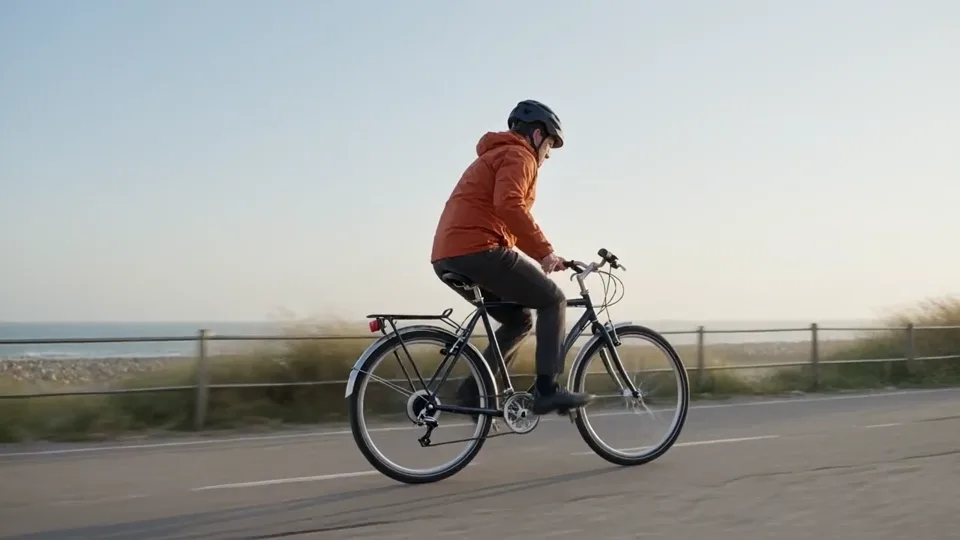
The clip below was generated with Kling 3.0 Turbo on our site. The prompt isolates one subject, one motion direction and one camera movement. You can judge its framing and continuity yourself. It is not a Kling 4.0 test.
The brief asks for a lone cyclist in a rust-orange jacket, a low side-tracking camera, the entire rider kept in frame, and one uninterrupted take. Those are the variables we would preserve in a later head-to-head test.
Here is another kind of test, generated on this site with Kling 3.0, not 4.0: a paper sailboat traversing a shallow pond. The boat's outline and the low camera angle make discontinuities easier to spot than in a fast-cut montage.
How to run a fair 4.0 comparison later
Hold the brief steady. Use the same subject, action, framing, aspect ratio and duration whenever both models support them. If one mode cannot accept a first frame or a particular duration, say so rather than silently changing the test.
Measure usable clips, not a single hero frame. Watch each output from beginning to end. Record subject consistency, unwanted cuts, camera adherence, text artifacts, audio alignment and how often a clip must be discarded. A sharp thumbnail does not settle a video comparison.
Count all attempts and actual cost. If one output looks better only after six retries, that is relevant to a creator. Record queue time, displayed quote and final charge. Do not compare a discounted trial with a full-priced production route without saying so.
Keep a human rubric. Ask at least two reviewers to score the same outputs without seeing the model label first. Distinguish measurable defects from taste. Publish failures as well as wins, or the comparison becomes a gallery of selected successes.
A practical review sheet
Score each completed clip from 0 to 2 on five observable checks: subject stability, requested motion, camera adherence, scene continuity, and usable ending. A zero means a blocking defect, one means usable with editing or caveats, and two means the brief is met. Record the reason beside each score and save the full clip; a composite number without the underlying observations is not useful. Review audio separately when the particular mode supports it.
Run several attempts per model with the same eligible settings and keep every attempt in the cost calculation, including timeouts and unusable outputs. Do not infer a universal “win rate” from a handful of hand-picked gallery pieces. Report the sample size, time window, location or account eligibility, settings and whether a first-frame asset was supplied. The model could change later; date every comparison.
Three test briefs worth keeping on file
Motion: “A cyclist in an orange jacket travels left to right on a coastal path. A low camera tracks alongside at matching speed. Keep the bicycle entirely in frame in one continuous shot.” This isolates direction and tracking.
Identity: “Starting from the supplied amber perfume bottle photo, slide the camera gently right while the bottle, black cap and plinth remain still. Preserve its silhouette, label and contact shadow.” This tests reference fidelity; it requires your own suitable image.
Depth: “Push slowly through layered paper trees toward a small lit observatory at dusk. Preserve the building silhouette and window positions while foreground layers show parallax.” This tests spatial continuity. Shorten or simplify each brief if the live mode imposes a tighter duration.
Which path should you take now?
Use Kling 3.0 for a brief you need to make today. The live standard and Turbo pages expose their actual controls. Use the Kling 4.0 preview to collect candidate briefs and request an alert. Once 4.0 has a documented API and genuine results, a side-by-side quality judgment can replace this provisional decision guide.
If you are integrating rather than creating, the separate Kling 4.0 API availability checklist covers the technical gate. If you are writing prompts, the keyframe planning guide explains what you can prepare without pretending the new mode already works.